

Files + Batch 接口使用指南(OpenAI 兼容版)
功能介绍
批量推理可以⼀次性处理⼤量数据,并对这些数据进⾏统⼀推理预测,最后将结果输出到指定位置。适合⼤批量数据处理、分析的场景等。批量推理的计费仅为实时推理的40%,帮助您有效节省资源消耗成本。
1、前置准备
- 获取APikey:调用本文API,需使用API Key鉴权方式。使用API Key鉴权调用API流程,具体调用流程,请查看认证鉴权。
- 开通BOS:账户需要开通BOS对象存储,如您未开通BOS功能,可提前开通。
2、标准操作流程
整个批推过程分为四个步骤:准备数据 -> 上传文件 -> 创建 Batch 任务 -> 查询结果。
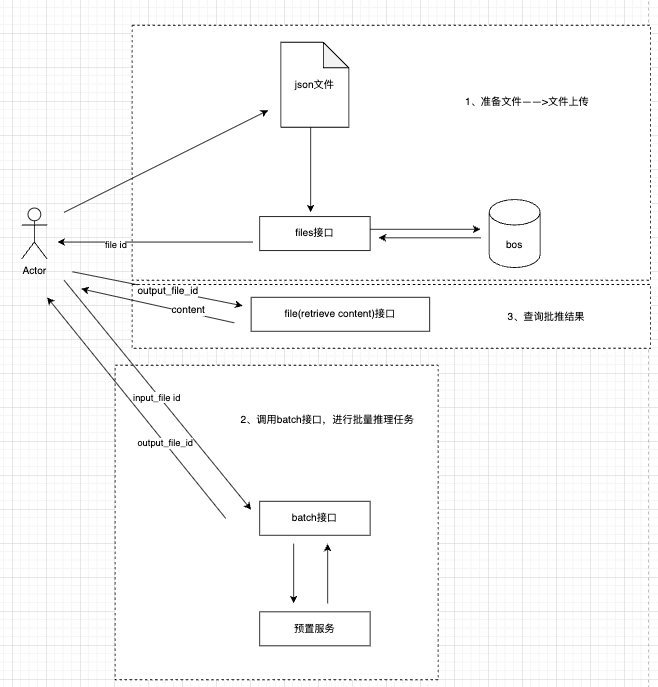
2.1、数据准备
创建一个.jsonl文件(例如batch_input.jsonl),每一行是一个独立的 JSON 对象,格式需严格符合 OpenAI 的 Batch 标准。 JSONL文件内容示例:
1{"custom_id": "request-1", "method": "POST", "url": "/v2/chat/completions", "body": {"model": "deepseek-v3.2", "messages": [{"role": "system", "content": "You are a helpful assistant."}, {"role": "user", "content": "Hello world!"}],"top_p": 0.95, "temperature": 1.0}}
2{"custom_id": "request-2", "method": "POST", "url": "/v2/chat/completions", "body": {"model": "deepseek-v3.2", "messages": [{"role": "system", "content": "You are a helpful assistant."}, {"role": "user", "content": "Hello world!"}],"top_p": 0.95, "temperature": 1.0}}- 注意:由于此jsonl文件会用于后续的批量推理任务,因此需要严格符合 OpenAI 的 Batch的文件格式要求
- 文件内字段说明:
| 字段 | 类型 | 必填 | 说明 |
|---|---|---|---|
| custom_id | String | 是 | 每一行请求的唯一标识。由于批量任务是异步且可能乱序处理的,结果文件将通过此ID与您的原始请求进行关联对应。 |
| method | String | 是 | HTTP请求方法,仅支持POST. |
| url | String | 是 | API关联的URL,需和创建batch任务时的endpoint保持一致。 chat与视觉理解模型为:/v2/chat/completions. 图像生成为:/v2/images/generations. 图像编辑为:/v2/images/edits. |
| body | Object | 是 | 模型调用的请求体,包含调用模型所需的全部参数,如model、messages、enable_thinking,thinking_budget等。请求体中的参数与实时推理接口所支持的参数保持一致。如果需要进一步扩展支持更多参数(如max_tokens, temperature等),也可以添加到body中,参数之间通过英文逗号隔开。 |
| replace | Array | 否 | 在已有请求体的基础上,对指定字段进行覆盖。适用于针对单条请求修改公共 body 中的部分参数。 |
2.2、利用files接口上传文件
前置条件:
在 sdk 当中创建一个 OpenAI 连接 client,后续 SDK 示例当中统一使用此 client 对象。
1from openai import OpenAI
2import os
3
4# 从环境变量中获取您的API KEY,
5api_key = os.getenv('QIANFAN_API_KEY')
6base_url = os.getenv('QIANFAN_BASE_URL')
7
8client = OpenAI(
9    base_url=base_url,
10    api_key=api_key
11)
2.2.1 接口文档
查看详细参数:https://cloud.baidu.com/doc/qianfan-api/s/9mi6szj38
上传files文件校验:
- 文件格式必须为JSONL,每行一个JSON格式的请求
- 单个Batch最多包含5000个请求
-
单个Batch任务的所有请求必须选用同一个模型。
- 提示:用户如果要使用OpenAI SDK,需要保持同一batch任务中model统一,强制异步校验,model不统一会报错。可以在2.3创建批量推理任务中使用
"replace":{"model":"deepseek-v3"}统一替换jsonl文件中的model参数,用于统一覆盖输入文件中所有请求的模型参数。
- 提示:用户如果要使用OpenAI SDK,需要保持同一batch任务中model统一,强制异步校验,model不统一会报错。可以在2.3创建批量推理任务中使用
- 单行的请求内容需遵循各模型上下文长度限制
- Batch文件最大为1G
- 每一行的body中必须包含messages对象数组
- 可以为每一行数据按需设置相同或不同的推理参数,如设定不同的temperature、top_p
2.2.2调用示例
http 请求示例:
1curl --location 'https://qianfan.baidubce.com/v2/files' \
2--header 'Authorization: Bearer bce-v3/ALTAK-dy8TsIJ*****' \
3--header 'content-type: multipart/form-data' \
4--form 'purpose="batch"' \
5--form 'file=@"batchinput.jsonl"'
sdk 请求示例:
1from openai import OpenAI
2
3batch_input_file = client.files.create(
4    file=open("batchinput.jsonl", "rb"),
5    purpose="batch"
6)
7
8print(batch_input_file)
返回示例:
1{
2    "id": "file-wbigmvy9mu",
3    "object": "file",
4    "bytes": 26285,
5    "created_at": 1770300205,
6    "filename": "batchinput.jsonl",
7    "purpose": "batch"
8}
2.3、创建批量推理任务
2.3.1 接口文档
查看详细参数:https://cloud.baidu.com/doc/qianfan-api/s/Vmimtsj8f
2.3.2调用示例
http 请求示例:
1curl --location 'https://qianfan.baidubce.com/v2/batches' \
2--header 'Content-Type: application/json' \
3--header 'Authorization: Bearer bce-v3/ALTAK-dy8Ts******' \
4--data '{
5    "completion_window": "1h",
6    "endpoint": "/v2/chat/completions",
7    "input_file_id": "file-wbigmvy9mu",
8    "metadata": {
9        "description": "nightly eval job"
10    },
11    "replace": {
12        "model": "deepseek-v3"
13    }
14}'
sdk 请求示例:
1from openai import OpenAI
2
3batch_input_file_id = batch_input_file.id
4client.batches.create(
5    input_file_id=batch_input_file_id,
6    endpoint="/v2/chat/completions",
7    completion_window="24h",
8    metadata={
9        "description": "nightly eval job"
10    },
11    extra_body={"replace":{"model": "deepseek-v3"}}
12)
返回示例:
1{
2    "id": "infer-1gc4wzdxphfd",
3    "object": "batch",
4    "endpoint": "/v2/chat/completions",
5    "model": "deepseek-v3",
6    "errors": null,
7    "input_file_id": "file-wbigmvy9mu",
8    "completion_window": "1h",
9    "status": "Queuing",
10    "output_file_id": null,
11    "error_file_id": null,
12    "created_at": 1770300856,
13    "in_progress_at": null,
14    "expires_at": 1770304456,
15    "finalizing_at": null,
16    "completed_at": null,
17    "failed_at": null,
18    "expired_at": null,
19    "cancelled_at": null,
20    "cancelling_at": null,
21    "request_counts": {
22        "total": 0,
23        "completed": 0,
24        "failed": 0
25    },
26    "usage": {
27        "input_tokens": 0,
28        "input_tokens_details": {
29            "cached_tokens": 0
30        },
31        "output_tokens": 0,
32        "output_tokens_details": {
33            "reasoning_tokens": 0
34        },
35        "total_tokens": 0
36    },
37    "metadata": {
38        "description": "nightly eval job"
39    }
40}
2.4 获取批量推理任务详情
批量推理任务为异步任务,因此可以通过查询接口来获取批量推理任务详情
2.4.1 接口文档
详细参数参考:https://cloud.baidu.com/doc/qianfan-api/s/ymir8ggss
2.4.2调用示例
请求:
1curl --location 'https://qianfan.baidubce.com/v2/batches/infer-1gc4wzdxphfd' \
2--header 'Content-Type: application/json' \
3--header 'Authorization: Bearer bce-v3/ALTAK-dy8TsIJ*****' \
4--data ''
sdk 请求示例:
1from openai import OpenAI
2
3batch = client.batches.retrieve("infer-1gc4wzdxphfd")
4print(batch)
返回:
1{
2    "id": "infer-1gc4wzdxphfd",
3    "object": "batch",
4    "endpoint": "/v2/chat/completions",
5    "model": "deepseek-v3",
6    "errors": null,
7    "input_file_id": "file-wbigmvy9mu",
8    "completion_window": "1h",
9    "status": "Done",
10    "output_file_id": "file-07vha6gj46",
11    "error_file_id": null,
12    "created_at": 1770300856,
13    "in_progress_at": 1770300867,
14    "expires_at": 1770304456,
15    "finalizing_at": 1770302944,
16    "completed_at": 1770302944,
17    "failed_at": null,
18    "expired_at": null,
19    "cancelled_at": null,
20    "cancelling_at": null,
21    "request_counts": {
22        "total": 100,
23        "completed": 100,
24        "failed": 0
25    },
26    "usage": {
27        "input_tokens": 1398,
28        "input_tokens_details": {
29            "cached_tokens": 0
30        },
31        "output_tokens": 1875,
32        "output_tokens_details": {
33            "reasoning_tokens": 0
34        },
35        "total_tokens": 3273
36    },
37    "metadata": {
38        "description": "nightly eval job"
39    }
40}
2.5 利用files接口获取任务执行结果
通过files的retrieve content接口获取任务的执行结果,其中file.id为查询批量推理任务中返回的output_file_id。
2.5.1 接口文档
接口参数详情:https://cloud.baidu.com/doc/qianfan-api/s/Bmi6vu310
2.5.2调用示例
Http 调用示例:
1curl --location 'https://qianfan.baidubce.com/v2/files/file-07vha6gj46/content' \
2--header 'Content-Type: application/json' \
3--header 'Authorization: Bearer bce-v3/ALTAK-dy****' \
4--data ''
sdk 调用示例:
1from openai import OpenAI
2
3file_response = client.files.content("file-07vha6gj46")
4print(file_response.text)
返回结果:
1{"response": {"status_code": 200, "body": {"choices": [{"finish_reason": "stop", "flag": 0, "index": 0, "message": {"content": "Hello! How can I assist you today? ", "role": "assistant"}}], "created": 1770302934, "id": "as-v73juzcn8r", "model": "offline-tjzj-deepseekv3", "object": "chat.completion", "usage": {"completion_tokens": 11, "prompt_tokens": 14, "total_tokens": 25}}, "request_id": "as-v73juzcn8r"}, "custom_id": "request-81", "id": "as-v73juzcn8r"}
2{"response": {"status_code": 200, "body": {"choices": [{"finish_reason": "stop", "flag": 0, "index": 0, "message": {"content": "Hello! How can I assist you today? ", "role": "assistant"}}], "created": 1770302934, "id": "as-6q6a66udc5", "model": "offline-tjzj-deepseekv3", "object": "chat.completion", "usage": {"completion_tokens": 11, "prompt_tokens": 14, "total_tokens": 25}}, "request_id": "as-6q6a66udc5"}, "custom_id": "request-65", "id": "as-6q6a66udc5"}
3......
评价此篇文章