

试卷切题与识别(多模态)
更新时间:2026-06-03
接口描述
支持对整页试卷、习题册、作业本等场景进行全自动题目切分,并基于多模态大模型能力,准确识别手写、公式、英语等题目内容。可快速接入拍照搜题、题库录入、智能批改等业务场景,显著降低人工录入成本,提升题目处理效率与识别准确率。
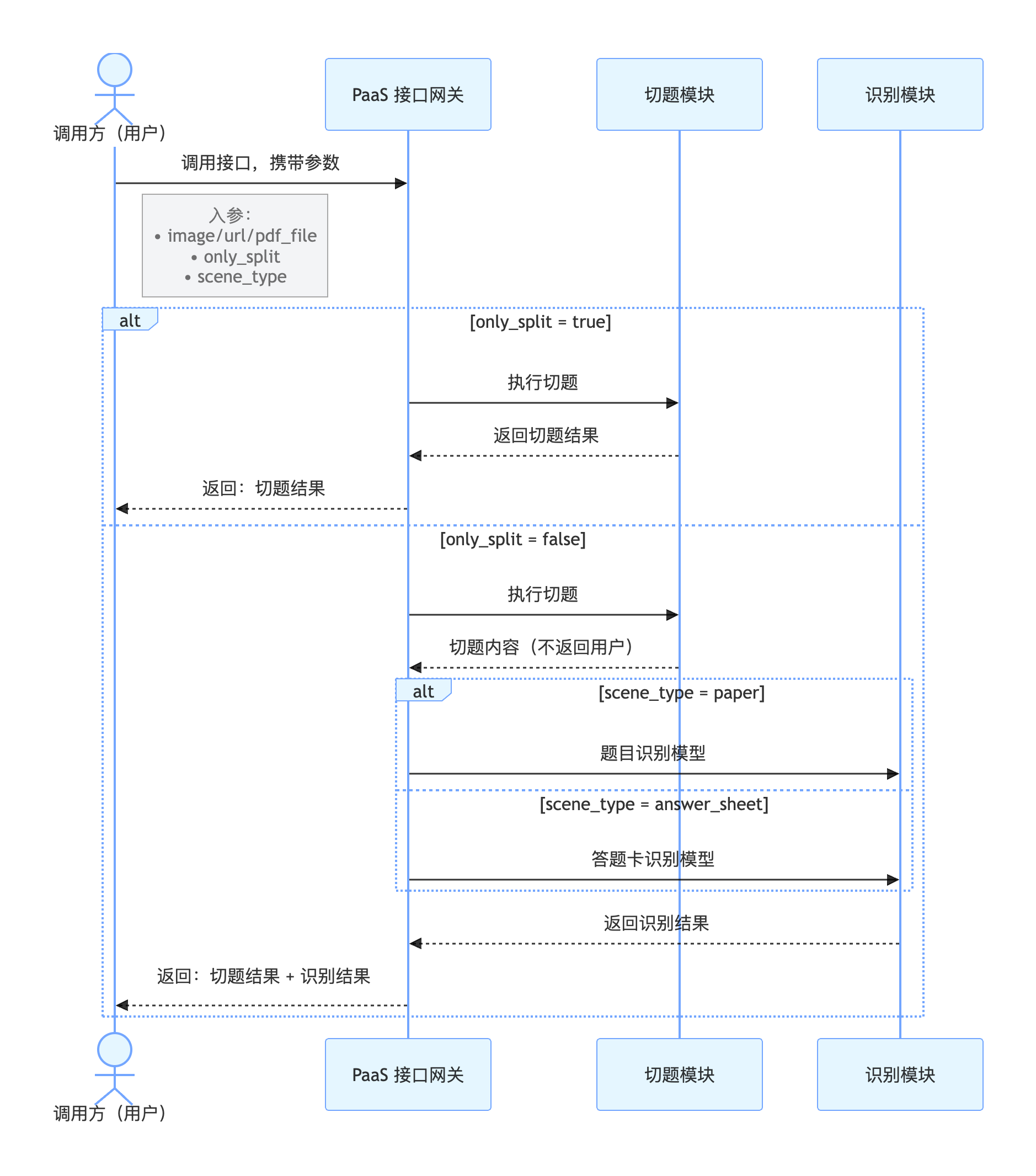
题目切分+识别:异步接口,需要先调用提交请求接口获取 task_id ,然后调用获取结果接口进行结果轮询,建议提交请求后 5~10 秒轮询。提交请求接口QPS为2,获取结果接口QPS为10,需将请求参数only_split设置为false。
仅题目切分:同步接口,提交后同步返回切题结果,需将请求参数only_split设置为true。
在线调试
您可以在 示例代码中心 中调试该接口,可进行签名验证、查看在线调用的请求内容和返回结果、示例代码的自动生成。
提交请求接口
请求说明
请求示例
HTTP 方法:POST
请求URL: https://aip.baidubce.com/rest/2.0/ocr/v1/paper_cut_edu_vlm/create_task
URL参数:
| 参数 | 值 |
|---|---|
| access_token | 通过API Key和Secret Key获取的access_token,参考“Access Token获取” |
Header如下:
| 参数 | 值 |
|---|---|
| Content-Type | application/json |
Body中放置请求参数,参数详情如下:
请求参数
| 参数 | 是否必选 | 类型 | 可选值范围 | 说明 |
|---|---|---|---|---|
| image | 和 url/pdf_file 三选一 | string | - | 图像数据,base64编码后进行urlencode,要求base64编码和urlencode后大小不超过10M,最短边至少15px,最长边最大8192px,支持jpg/jpeg/png/bmp格式优先级:image > url > pdf_file,当image字段存在时,url、pdf_file字段失效 |
| url | 和 image/pdf_file 三选一 | string | - | 图片完整url,url长度不超过1024字节,url对应的图片base64编码后大小不超过10M,最短边至少15px,最长边最大8192px,支持jpg/jpeg/png/bmp格式优先级:image > url > pdf_file,当image字段存在时,url字段失效请注意关闭URL防盗链 |
| pdf_file | 和 image/url 三选一 | string | - | PDF文件,base64编码后进行urlencode,要求base64编码和urlencode后大小不超过10M,最短边至少15px,最长边最大8192px优先级:image > url > pdf_file,当image、url字段存在时,pdf_file字段失效 |
| pdf_file_num | 否 | string | - | 需要识别的PDF文件的对应页码,当 pdf_file 参数有效时,识别传入页码的对应页面内容,若不传入,则默认识别第 1 页 |
| only_split | 否 | bool | true/false | 是否仅进行题目切分,默认不打开,即:false。可选值包括:- true :开启,返回单题位置信息以及题内手写答案位置信息,按照同步方式返回- false:不开启,返回单题位置信息以及题内结构化文本信息,按照异步方式返回 |
| scene_type | 是 | string | paper/answer_sheet 二选一 | 指定传入文件的场景类型,默认使用paper- paper:试卷题目识别场景- answer_sheet :答题卡识别场景 |
| enhance | 否 | bool | true/false | 是否开启矫正增强,默认关闭 |
返回说明
返回参数
| 字段 | 类型 | 说明 |
|---|---|---|
| log_id | uint64 | 唯一的log id,用于问题定位 |
| error_code | int | 错误码 |
| error_msg | string | 错误描述信息 |
| result | dict | 返回的结果列表 |
| + task_id | string | 该请求生成的任务ID,后续使用该task_id获取批改结果 |
返回示例
成功返回示例:
JSON
1{
2    "error_code": "0",
3    "error_msg": "",
4    "result": {
5        "task_id": "1996199501805445169"
6    },
7    "log_id": 1996199501805445169
8}失败返回示例(详细的错误码说明见API文档-错误码):
JSON
1{
2    "log_id": 1965746008642488944,
3    "error_msg": "image format error",
4    "error_code": 216201
5}
获取结果接口
请求说明
请求示例
HTTP 方法:POST
请求URL: https://aip.baidubce.com/rest/2.0/ocr/v1/paper_cut_edu_vlm/get_result
URL参数:
| 参数 | 值 |
|---|---|
| access_token | 通过API Key和Secret Key获取的access_token,参考“Access Token获取” |
Header如下:
| 参数 | 值 |
|---|---|
| Content-Type | application/json |
Body中放置请求参数,参数详情如下:
请求参数
| 参数 | 是否必选 | 类型 | 说明 |
|---|---|---|---|
| task_id | 是 | string | 发送提交请求时返回的task_id |
返回说明
返回参数
| 字段 | 类型 | 说明 |
|---|---|---|
| log_id | uint64 | 唯一的log id,用于问题定位 |
| error_code | int | 错误码 |
| error_msg | string | 错误描述信息 |
| result | dict | 返回的结果列表 |
| + task_id | string | 任务ID |
| + status | string | 任务状态,- pending:排队中(err_code=50)- running:运行中(err_code=60)- success:成功(err_code=0)- failed:失败(err_code为具体的报错类型) |
| + created_time | string | 任务创建时间 |
| + started_time | string | 任务开始时间 |
| + finished_time | string | 任务结束时间 |
| + duration | string | 任务执行时长 |
| + result | dict | 识别结果 |
| ++enhance_url | string | 矫正后的图片url |
| ++ qus_result_num | int32 | 识别题目结果数 |
| ++ qus_result | array[] | 题目元素信息 |
| +++ qus_id | int32 | 题号 |
| +++ location | object | 切题位置信息 |
| ++++ qus_location | array[] | 单道题位置信息,按照 [x,y,w,h]方式返回,其中 x,y 为左上顶点坐标 |
| ++++ pic_location | array[] | 图片的位置信息,按照 [x,y,w,h]方式返回,其中 x,y 为左上顶点坐标 |
| ++++ ans_location | array[] | 单道题内的手写内容位置信息,当only_slpit=false时不返回 |
| +++ qus_elements | object | 识别结果 |
| ++++ qus_words | string | 题目文本信息,当scene_type=paper时输出 |
| ++++ choices | array[] | 选项文本信息,当qus_type为选择题时有值 |
| ++++ qus_type | string | 题目类型,当scene_type=paper时输出 |
| ++++ ans_words | array[] | 手写作答信息 |
返回示例
成功返回示例:
示例一:仅切题场景
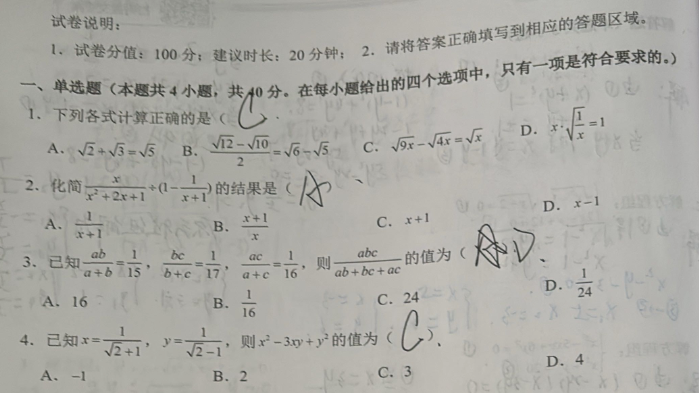
JSON
1{
2  "error_code": "0",
3  "error_msg": "",
4  "result": {
5    "task_id": "1965376138007096888",
6    "status": "Success",
7    "created_time": 1757417161000,
8    "started_time": 1757417162000,
9    "finished_time": 1757497412914,
10    "duration": 80250914,
11    "result": {
12      "qus_result_num": 4,
13      "qus_result": [
14        {
15          "qus_id": 1,
16          "location": {
17            "qus_location": [
18              { "x": 100, "y": 50, "w": 95, "h": 20 },
19              { "x": 100, "y": 50, "w": 95, "h": 20 }
20            ],
21            "pic_location": [
22              { "x": 100, "y": 50, "w": 95, "h": 20 }
23            ],
24            "ans_location": [
25              { "x": 100, "y": 50, "w": 95, "h": 20 }
26            ]
27          }
28        },
29        {
30          "qus_id": 2,
31          "location": {
32            "qus_location": [
33              { "x": 100, "y": 50, "w": 95, "h": 20 },
34              { "x": 100, "y": 50, "w": 95, "h": 20 }
35            ],
36            "pic_location": [
37              { "x": 100, "y": 50, "w": 95, "h": 20 }
38            ],
39            "ans_location": [
40              { "x": 100, "y": 50, "w": 95, "h": 20 }
41            ]
42          }
43        },
44        {
45          "qus_id": 3,
46          "location": {
47            "qus_location": [
48              { "x": 100, "y": 50, "w": 95, "h": 20 },
49              { "x": 100, "y": 50, "w": 95, "h": 20 }
50            ],
51            "pic_location": [
52              { "x": 100, "y": 50, "w": 95, "h": 20 }
53            ],
54            "ans_location": [
55              { "x": 100, "y": 50, "w": 95, "h": 20 }
56            ]
57          }
58        },
59        {
60          "qus_id": 4,
61          "location": {
62            "qus_location": [
63              { "x": 100, "y": 50, "w": 95, "h": 20 },
64              { "x": 100, "y": 50, "w": 95, "h": 20 }
65            ],
66            "pic_location": [
67              { "x": 100, "y": 50, "w": 95, "h": 20 }
68            ],
69            "ans_location": [
70              { "x": 100, "y": 50, "w": 95, "h": 20 }
71            ]
72          }
73        }
74      ]
75    }
76  }
77}
示例二:试卷场景

JSON
1{
2  "error_code": "0",
3  "error_msg": "",
4  "result": {
5    "task_id": "1965376138007096888",
6    "status": "Success",
7    "created_time": 1757417161000,
8    "started_time": 1757417162000,
9    "finished_time": 1757497412914,
10    "duration": 80250914,
11    "result": {
12      "qus_result_num": 1,
13      "qus_result": [
14        {
15          "qus_id": 1,
16          "location": {
17            "qus_location": [
18              { "x": 100, "y": 50, "w": 95, "h": 20 },
19              { "x": 100, "y": 50, "w": 95, "h": 20 }
20            ],
21            "pic_location": [
22              { "x": 100, "y": 50, "w": 95, "h": 20 }
23            ]
24          },
25          "qus_elements": {
26            "question_words": "2.一袋奶粉重500克。每天用50克,用了7天,还剩多少克?",
27            "choices": [],
28            "qus_type": "问答题",
29            "answer_words": [
30              "150克"
31            ]
32          }
33        }
34      ]
35    }
36  }
37}
示例三:答题卡场景
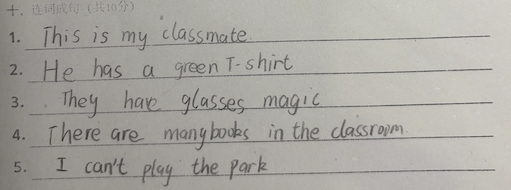
JSON
1{
2  "error_code": "0",
3  "error_msg": "",
4  "result": {
5    "task_id": "1965376138007096888",
6    "status": "Success",
7    "created_time": 1757417161000,
8    "started_time": 1757417162000,
9    "finished_time": 1757497412914,
10    "duration": 80250914,
11    "result": {
12      "log_id": 9876543210123124,
13      "qus_result_num": 1,
14      "qus_result": [
15        {
16          "que_id": 1,
17          "location": {
18            "qus_location": [
19              {
20                "x": 100,
21                "y": 50,
22                "w": 95,
23                "h": 20
24              }
25            ],
26            "pic_location": [
27              {
28                "x": 100,
29                "y": 50,
30                "w": 95,
31                "h": 20
32              }
33            ]
34          },
35          "qus_elements": {
36            "question_words": "",
37            "choices": [],
38            "qus_type": "",
39            "answer_words": [
40              {
41                "number": "1.",
42                "answer": "This is my classmate"
43              },
44              {
45                "number": "2.",
46                "answer": "He has a green T-shirt."
47              },
48              {
49                "number": "3.",
50                "answer": "They have glasses magic"
51              },
52              {
53                "number": "4.",
54                "answer": "There are many books in the classroom."
55              },
56              {
57                "number": "5.",
58                "answer": "I can't play the park."
59              }
60            ]
61          }
62        }
63      ]
64    }
65  }
66}失败返回示例(详细的错误码说明见API文档-错误码):
JSON
1{
2    "log_id": 1965712846932687146,
3    "error_msg": "recognize error",
4    "error_code": 216630
5}
评价此篇文章