使用流程
-
获取API Key
- 登录百度智能云控制台
- 进入相应服务获取API Key
-
查询技能元数据
- 调用
GET /api/skills/v1/{ep-id}/metadata
- 解析返回的
inputs和outputs结构
-
构建调用请求
- 根据元数据中的
inputs[].schema字段定义
- 为每个字段的
value属性填入实际业务值
- 注意:
value必须是JSON字符串的转义形式
-
执行技能调用
- 调用
POST /api/skills/v1/{ep-id}/run
- 解析返回结果
获取技能元数据
接口描述
本接口用于获取指定技能端点的详细元数据信息,包括输入输出参数的结构定义。通过此接口,开发者可以了解技能所需的输入参数类型、格式要求,以及输出结果的结构,从而动态构建正确的调用请求。
权限说明
所有接口均采用API Key认证机制。
请求结构
1GET /api/skills/v1/{ep-id}/metadata HTTP/1.1
2Host: yijian-next.cloud.baidu.com
3Authorization: Bearer {您的API Key}
请求头域
| 头域 |
说明 |
是否必选 |
| Authorization |
Bearer {您的API Key} |
必选 |
请求参数
| 参数名称 |
类型 |
是否必选 |
参数位置 |
参数描述 |
| ep-id |
String |
是 |
URL参数 |
技能的唯一标识,格式如ep-public-example |
响应头域
| 头域 |
说明 |
| Content-Type |
application/json |
响应参数
| 参数名称 |
类型 |
参数描述 |
| success |
Boolean |
请求是否成功 |
| result |
Object |
技能元数据对象 |
| result.description |
String |
技能描述 |
| result.name |
String |
技能唯一标识 |
| result.displayName |
String |
技能展示名称 |
| result.version |
String |
技能版本号 |
| result.inputs |
Array<InputParam> |
输入参数定义列表 |
| result.outputs |
Array<OutputParam> |
输出参数定义列表 |
| 参数名称 |
类型 |
参数描述 |
| name |
String |
输入参数名 |
| displayName |
String |
参数展示名称 |
| type |
String |
输入参数类型,如 DataSet |
| valueType |
String |
字段值类型 |
| schema |
Array<SchemaField> |
输入参数字段定义列表 |
| optional |
Boolean |
是否可选 |
| defaultValue |
String |
默认值 |
OutputParam
| 参数名称 |
类型 |
参数描述 |
| name |
String |
输出参数名 |
| displayName |
String |
参数展示名称 |
| type |
String |
输出参数类型,如 DataSet |
| valueType |
String |
字段值类型 |
| schema |
Array<SchemaField> |
输出参数字段定义列表 |
| optional |
Boolean |
是否可选 |
| defaultValue |
String |
默认值 |
SchemaField
| 参数名称 |
类型 |
参数描述 |
| name |
String |
字段名 |
| displayName |
String |
字段展示名称 |
| type |
String |
字段类型,如 Image、Integer、String 等 |
| valueType |
String |
字段值类型 |
| description |
String |
字段描述 |
| optional |
Boolean |
是否可选 |
| defaultValue |
String |
默认值 |
错误码
注:/api/skills/v1/{ep-id} 由技能运行时服务处理。请求已命中技能端点但参数不合法时,通常返回 JSON 结构 {"success": false, "message": ...};如果 {ep-id} 不存在或路由未命中,直接返回 HTTP 404 文本响应。
| 错误码 |
错误描述 |
HTTP状态码 |
中文解释 |
| NotFound |
Skill endpoint not found |
404 |
指定的技能端点不存在 |
| Unauthorized |
Invalid API key |
401 |
API Key无效或缺失 |
请求示例
1GET /api/skills/v1/ep-xxxxx/metadata HTTP/1.1
2Host: yijian-next.cloud.baidu.com
3Authorization: Bearer {您的API Key}
1curl -X GET "https://yijian-next.cloud.baidu.com/api/skills/v1/ep-xxxxx/metadata" \
2     -H "Authorization: Bearer {您的API Key}"
响应示例
1{
2    "success": true,
3    "result": {
4        "description": "识别轮胎数量+识别轮胎上的标签",
5        "name": "workspaces/public/skills/c-sk-example",
6        "displayName": "UAT02技能FDDLVM识别",
7        "version": "V0.0.8",
8        "inputs": [
9            {
10                "name": "input0",
11                "displayName": "输入",
12                "type": "DataSet",
13                "schema": [
14                    {
15                        "name": "image",
16                        "displayName": "图片",
17                        "type": "Image",
18                        "schema": null,
19                        "defaultValue": "",
20                        "value": "",
21                        "valueType": "Image",
22                        "description": "输入的图片",
23                        "optional": true,
24                        "readonly": false,
25                        "constraint": null,
26                        "visuals": ""
27                    }
28                ],
29                "defaultValue": "",
30                "value": "",
31                "valueType": "DataSet",
32                "description": "",
33                "optional": true,
34                "readonly": false,
35                "constraint": null,
36                "visuals": ""
37            }
38        ],
39        "outputs": [
40            {
41                "name": "output0",
42                "displayName": "输出",
43                "type": "DataSet",
44                "schema": [
45                    {
46                        "name": "message",
47                        "displayName": "输出信息",
48                        "type": "TemplateString",
49                        "schema": null,
50                        "defaultValue": "",
51                        "value": "理由:${MultimodalLargeLanguageModelOperator-node-1764663392578.outputs.output0.result.answer.reason}",
52                        "valueType": "TemplateString",
53                        "description": "",
54                        "optional": true,
55                        "readonly": false,
56                        "constraint": null,
57                        "visuals": ""
58                    },
59                    {
60                        "name": "tire_count",
61                        "displayName": "tire_count",
62                        "type": "Integer",
63                        "schema": null,
64                        "defaultValue": "0",
65                        "value": "${MultimodalLargeLanguageModelOperator-node-1764663392578.outputs.output0.result.answer.tire_count}",
66                        "valueType": "Integer",
67                        "description": "",
68                        "optional": true,
69                        "readonly": false,
70                        "constraint": null,
71                        "visuals": ""
72                    },
73                    {
74                        "name": "tire_label_count",
75                        "displayName": "tire_label_count",
76                        "type": "Integer",
77                        "schema": null,
78                        "defaultValue": "0",
79                        "value": "${MultimodalLargeLanguageModelOperator-node-1764663392578.outputs.output0.result.answer.tire_label_count}",
80                        "valueType": "Integer",
81                        "description": "",
82                        "optional": true,
83                        "readonly": false,
84                        "constraint": null,
85                        "visuals": ""
86                    }
87                ],
88                "defaultValue": "",
89                "value": "",
90                "valueType": "DataSet",
91                "description": "输出信息",
92                "optional": false,
93                "readonly": false,
94                "constraint": null,
95                "visuals": ""
96            }
97        ]
98    }
99}
技能调用运行
接口描述
本接口用于执行技能调用,传入实际业务参数并返回分析结果。调用前需先通过获取技能元数据接口了解技能的输入输出结构,根据元数据定义构建正确的请求体。
注意事项
- 不同技能的输入输出结构不同,必须通过元数据接口动态获取
- 调用接口时,schema 中的 value 字段必须是 JSON 字符串的转义形式
- 必填字段需确保都有值,可选字段可不填
- 传入的 value 类型必须与元数据中的 type 或 valueType 匹配
Array<T>类型应传入JSON数组字符串- 视觉类型应传入完整的JSON对象字符串
权限说明
所有接口均采用API Key认证机制。
请求结构
1POST /api/skills/v1/{ep-id}/run HTTP/1.1
2Host: yijian-next.cloud.baidu.com
3Authorization: Bearer {您的API Key}
4Content-Type: application/json
5
6{
7  "inputs": [
8    {
9      "name": "input0",
10      "type": "DataSet",
11      "schema": [
12        {
13          "name": "image",
14          "type": "Image",
15          "value": "{...}"
16        }
17      ]
18    }
19  ]
20}
请求头域
| 头域 |
说明 |
是否必选 |
| Authorization |
Bearer {您的API Key} |
必选 |
| Content-Type |
application/json |
必选 |
请求参数
| 参数名称 |
类型 |
是否必选 |
参数位置 |
参数描述 |
| ep-id |
String |
是 |
URL参数 |
技能的唯一标识,格式如ep-public-example |
| inputs |
Array<RunInput> |
是 |
RequestBody参数 |
输入参数列表,结构与元数据中的 inputs 对应 |
| 参数名称 |
类型 |
是否必选 |
参数描述 |
| name |
String |
是 |
参数名,与元数据一致 |
| type |
String |
是 |
参数类型,与元数据一致 |
| valueType |
String |
否 |
字段值类型 |
| schema |
Array<RunSchemaField> |
是 |
字段列表,与元数据一致 |
| optional |
Boolean |
否 |
是否可选 |
| defaultValue |
String |
否 |
默认值 |
RunSchemaField
| 参数名称 |
类型 |
是否必选 |
参数描述 |
| name |
String |
是 |
字段名,与元数据一致 |
| type |
String |
是 |
字段类型,与元数据一致 |
| value |
String |
是 |
实际业务值,必须是 JSON 字符串的转义形式 |
| optional |
Boolean |
否 |
是否可选 |
| defaultValue |
String |
否 |
默认值 |
| description |
String |
否 |
字段描述 |
| displayName |
String |
否 |
字段展示名称 |
| visuals |
String |
否 |
可视化样式 |
| readonly |
Boolean |
否 |
是否只读 |
| constraint |
Object |
否 |
约束条件 |
| schema |
Object |
否 |
嵌套结构 |
响应头域
| 头域 |
说明 |
| Content-Type |
application/json |
响应参数
响应结构根据技能的 outputs 定义动态变化,通常包含:
| 参数名称 |
类型 |
参数描述 |
| success |
Boolean |
调用是否成功 |
| result |
Object |
技能执行结果,结构由技能输出定义 |
| result.outputs |
Array |
输出参数列表 |
| result.outputs[].name |
String |
输出参数名 |
| result.outputs[].type |
String |
输出参数类型 |
| result.outputs[].value |
String |
输出字段值,具体格式由输出参数类型决定 |
| result.outputs[].schema |
Array | null |
输出参数字段列表;当输出项本身为字段时通常为 null |
| result.outputs[].schema[].name |
String |
字段名 |
| result.outputs[].schema[].value |
String |
字段值 |
错误码
注:/api/skills/v1/{ep-id} 由技能运行时服务处理。请求已命中技能端点但参数不合法时,通常返回 JSON 结构 {"success": false, "message": ...};如果 {ep-id} 不存在或路由未命中,直接返回 HTTP 404 文本响应。
| 错误码 |
错误描述 |
HTTP状态码 |
中文解释 |
| BadRequest |
Invalid request parameters |
400 |
请求参数不合法,检查请求体格式 |
| Unauthorized |
Invalid API key |
401 |
API Key无效或缺失 |
| NotFound |
Skill endpoint not found |
404 |
指定的技能端点不存在 |
| InternalServerError |
Internal server error |
500 |
服务器内部错误,稍后重试 |
请求示例
图像输入示例
1{
2    "inputs": [
3        {
4            "name": "input0",
5            "displayName": "输入",
6            "type": "DataSet",
7            "schema": [
8                {
9                    "defaultValue": "",
10                    "description": "输入的图片",
11                    "displayName": "图片",
12                    "name": "image",
13                    "optional": false,
14                    "readonly": false,
15                    "type": "Image",
16                    "value": "{\"imageData\": \"+q5dukt+A\", \"imageDataType\":\"base64\", \"imageId\": \"123456\", \"sourceId\": \"dev2\", \"imageWidth\": \"640\", \"imageHeight\": \"428\", \"timestamp\": \"1762498237615\"}",
17                    "visuals": ""
18                }
19            ],
20            "defaultValue": "",
21            "value": "",
22            "valueType": "DataSet",
23            "description": "",
24            "optional": true,
25            "readonly": false,
26            "constraint": null,
27            "visuals": ""
28        }
29    ]
30}
视频输入示例
1{
2    "inputs": [
3        {
4            "name": "input0",
5            "displayName": "输入",
6            "type": "DataSet",
7            "schema": [
8                {
9                    "defaultValue": "",
10                    "description": "输入的视频",
11                    "displayName": "视频",
12                    "name": "video",
13                    "optional": false,
14                    "readonly": false,
15                    "type": "Video",
16                    "value": "{\"videoData\":\"http://xxx/xxx.mp4\",\"videoDataType\":\"url\",\"videoId\":\"123456\",\"videoWidth\":\"640\",\"videoHeight\":\"428\"}",
17                    "visuals": ""
18                }
19            ],
20            "defaultValue": "",
21            "value": "",
22            "valueType": "DataSet",
23            "description": "",
24            "optional": true,
25            "readonly": false,
26            "constraint": null,
27            "visuals": ""
28        }
29    ]
30}
完整curl示例
1curl -X POST "https://yijian-next.cloud.baidu.com/api/skills/v1/ep-public-example/run" \
2     -H "Authorization: Bearer {您的API Key}" \
3     -H "Content-Type: application/json" \
4     -d '{
5            "inputs": [
6              {
7                "name": "input0",
8                "displayName": "输入",
9                "type": "DataSet",
10                "schema": [
11                  {
12                    "defaultValue": "",
13                    "description": "输入的图片",
14                    "displayName": "图片",
15                    "name": "image",
16                    "optional": false,
17                    "readonly": false,
18                    "type": "Image",
19                    "value": "{\"imageData\": \"+q5dukt+A\", \"imageDataType\":\"base64\", \"imageId\": \"123456\", \"sourceId\": \"dev2\", \"imageWidth\": \"640\", \"imageHeight\": \"428\", \"timestamp\": \"1762498237615\"}",
20                    "visuals": ""
21                  }
22                ],
23                "defaultValue": "",
24                "value": "",
25                "valueType": "DataSet",
26                "description": "",
27                "optional": true,
28                "readonly": false,
29                "constraint": null,
30                "visuals": ""
31              }
32            ]
33         }'
响应示例
1{
2    "success": true,
3    "result": {
4        "outputs": [
5            {
6                "name": "message",
7                "displayName": "输出信息",
8                "type": "TemplateString",
9                "schema": null,
10                "defaultValue": "",
11                "value": "检测到3个轮胎,其中2个轮胎上有标签",
12                "valueType": "TemplateString",
13                "description": "",
14                "optional": true,
15                "readonly": false,
16                "constraint": null,
17                "visuals": ""
18            },
19            {
20                "name": "tire_count",
21                "displayName": "tire_count",
22                "type": "Integer",
23                "schema": null,
24                "defaultValue": "0",
25                "value": "3",
26                "valueType": "Integer",
27                "description": "",
28                "optional": true,
29                "readonly": false,
30                "constraint": null,
31                "visuals": ""
32            },
33            {
34                "name": "tire_label_count",
35                "displayName": "tire_label_count",
36                "type": "Integer",
37                "schema": null,
38                "defaultValue": "0",
39                "value": "2",
40                "valueType": "Integer",
41                "description": "",
42                "optional": true,
43                "readonly": false,
44                "constraint": null,
45                "visuals": ""
46            }
47        ]
48    }
49}
异步技能调用
同步调用(技能调用运行)会阻塞等待技能执行完成后返回结果,适合轻量、快速响应的场景。对于 VLM 深度推理、长耗时编排等场景,推荐使用异步调用:提交后立即返回 task_id,实际执行在后台进行,随后通过查询接口获取结果,或在发布技能时配置 Webhook,任务完成时主动接收回调。
| 模式 |
触发方式 |
响应 |
适用场景 |
| 同步 |
async 不传或 false |
阻塞返回结果 |
轻量推理、快速响应 |
| 异步 |
async: true |
result 中立即返回 task_id |
VLM 深度推理、长耗时编排 |
| 异步 Batch |
async: true + batch_inputs |
result 中立即返回 Batch 父任务和子任务列表 |
批量图片/视频处理 |
接口约定
| 说明项 |
内容 |
| 服务域名 |
yijian-next.cloud.baidu.com |
| 提交任务前缀 |
/api/skills/v1 |
| 任务管理前缀 |
/api/vistudio/v1 |
| 鉴权 |
Header 携带 Authorization: Bearer {您的API Key} |
结果获取方式
异步任务提交成功后,平台提供两种获取任务结果的方式:
| 方式 |
说明 |
响应结构 |
适用建议 |
| 平台托管结果查询 |
通过任务管理接口主动查询任务状态和结果 |
平台 API 响应,包含 success / result 外层包装 |
适合作为兜底查询方式 |
| Webhook 回调通知 |
任务完成后平台主动 POST 到发布技能时配置的 Webhook 地址 |
回调 body 直接为事件 payload,不包含 success / result 外层包装 |
推荐生产场景使用,并在业务侧自行持久化结果 |
注:当前平台侧任务状态和结果有效期为 3 小时,过期后会被清理。过期后通过任务管理接口查询可能返回任务不存在。建议配置 Webhook 回调,在任务完成时及时接收结果并按业务需要持久化。
提交异步任务
接口描述
在技能调用运行的请求体中增加 async: true 字段即可转为异步模式。接口路径、鉴权、inputs 结构均与同步调用一致,仅响应形态不同:异步模式立即返回 task_id,不阻塞等待执行结果。
权限说明
同接口约定,Header 携带 Authorization: Bearer {您的API Key}。
请求结构
1POST /api/skills/v1/{ep-id}/run HTTP/1.1
2Host: yijian-next.cloud.baidu.com
3Authorization: Bearer {您的API Key}
4Content-Type: application/json
请求头域
| 头域 |
说明 |
是否必选 |
| Authorization |
Bearer {您的API Key} |
必选 |
| Content-Type |
application/json |
必选 |
请求参数
| 参数名称 |
类型 |
是否必选 |
参数位置 |
参数描述 |
| ep-id |
String |
是 |
URL参数 |
技能的唯一标识,格式如ep-public-example |
| async |
Boolean |
是 |
RequestBody参数 |
必须为 true 以启用异步模式 |
| inputs |
Array<RunInput> |
是 |
RequestBody参数 |
输入参数列表,结构与同步调用一致 |
| timeout_s |
Integer |
否 |
RequestBody参数 |
任务执行超时时间,单位为秒,取值范围 1~600;未传时使用平台默认异步任务超时时间(当前默认 300 秒) |
timeout_s 作用域:仅控制当前异步任务被消费后,单次技能执行的最大耗时;不包含任务在 Pending 状态的排队等待时间,也不影响任务结果保留时间、Webhook 回调重试时间或同步调用链路的 HTTP 请求超时。执行超过该时间后,任务进入 Failed 状态,错误码为 TIMEOUT。
响应头域
| 头域 |
说明 |
| Content-Type |
application/json |
响应参数
| 参数名称 |
类型 |
参数描述 |
| success |
Boolean |
请求是否成功 |
| result |
Object |
异步任务提交结果 |
| result.task_id |
String |
任务唯一标识,格式为 task-{uuid} |
| result.status |
String |
初始状态,固定为 Pending |
| result.created_at |
String |
任务创建时间(UTC ISO 8601) |
错误码
| 错误码 |
错误描述 |
HTTP状态码 |
中文解释 |
| BadRequest |
Invalid request parameters |
400 |
请求参数不合法 |
| Unauthorized |
Invalid API key |
401 |
API Key无效或缺失 |
| NotFound |
Skill endpoint not found |
404 |
指定的技能端点不存在 |
| TooManyRequests |
Async task queue is full for this tenant |
429 |
租户异步任务队列已满 |
| ServiceUnavailable |
Failed to enqueue async task |
503 |
任务入队失败,稍后重试 |
请求示例
1curl -X POST "https://yijian-next.cloud.baidu.com/api/skills/v1/ep-public-example/run" \
2     -H "Authorization: Bearer {您的API Key}" \
3     -H "Content-Type: application/json" \
4     -d '{
5            "async": true,
6            "timeout_s": 300,
7            "inputs": [
8              {
9                "name": "input0",
10                "type": "DataSet",
11                "schema": [
12                  { "name": "image", "type": "Image", "value": "{\"imageData\":\"...\",\"imageDataType\":\"base64\"}" }
13                ]
14              }
15            ]
16         }'
响应示例
1{
2    "success": true,
3    "result": {
4        "task_id": "task-7f3a9b2c-4e1d-4b8a-9c3f-1a2b3c4d5e6f",
5        "status": "Pending",
6        "created_at": "2026-04-17T08:00:00.123456"
7    }
8}
批量提交异步任务
接口描述
在单次请求中提交多组输入,每组作为独立子任务执行,结果聚合到一个 Batch 父任务下。同样复用 /run 接口,将 inputs 替换为 batch_inputs。
权限说明
同接口约定,Header 携带 Authorization: Bearer {您的API Key}。
请求结构
1POST /api/skills/v1/{ep-id}/run HTTP/1.1
2Host: yijian-next.cloud.baidu.com
3Authorization: Bearer {您的API Key}
4Content-Type: application/json
请求头域
| 头域 |
说明 |
是否必选 |
| Authorization |
Bearer {您的API Key} |
必选 |
| Content-Type |
application/json |
必选 |
请求参数
| 参数名称 |
类型 |
是否必选 |
参数位置 |
参数描述 |
| ep-id |
String |
是 |
URL参数 |
技能的唯一标识 |
| async |
Boolean |
是 |
RequestBody参数 |
必须为 true |
| batch_inputs |
Array<Object> |
是 |
RequestBody参数 |
输入数组,每项为一个独立的 inputs 对象;默认最多 10 条 |
| timeout_s |
Integer |
否 |
RequestBody参数 |
Batch 子任务执行超时时间,单位为秒,取值范围 1~600;未传时使用平台默认异步任务超时时间(当前默认 300 秒) |
timeout_s 作用域:Batch 请求中的 timeout_s 会写入 Batch 父任务和每个子任务;真正执行时按每个子任务分别生效,限制单个子任务被消费后的执行耗时。它不是整批任务的总耗时上限,也不包含子任务在 Pending 状态的排队等待时间;某个子任务执行超过该时间时,该子任务进入 Failed 状态,错误码为 TIMEOUT,父任务状态按所有子任务终态聚合。
响应头域
| 头域 |
说明 |
| Content-Type |
application/json |
响应参数
| 参数名称 |
类型 |
参数描述 |
| success |
Boolean |
请求是否成功 |
| result |
Object |
Batch 父任务提交结果 |
| result.batch_id |
String |
父任务 ID,可用于查询聚合状态 |
| result.sub_tasks |
Array<Object> |
每个子任务的提交结果 |
| result.sub_tasks[].task_id |
String |
子任务 ID |
| result.sub_tasks[].status |
String |
子任务初始状态,固定为 Pending |
| result.sub_tasks[].created_at |
String |
子任务创建时间(UTC ISO 8601) |
| result.sub_tasks[].batch_index |
Integer |
子任务在批次中的序号(从 0 开始) |
| result.total |
Integer |
子任务总数 |
错误码
| 错误码 |
错误描述 |
HTTP状态码 |
中文解释 |
| BadRequest |
batch_inputs empty or exceeds max_batch_size |
400 |
batch_inputs 为空、超过上限(默认 10),或 timeout_s 不在 1~600 范围内 |
| Unauthorized |
Invalid API key |
401 |
API Key无效或缺失 |
| TooManyRequests |
Quota exceeded |
429 |
配额不足 |
请求示例
1curl -X POST "https://yijian-next.cloud.baidu.com/api/skills/v1/ep-public-example/run" \
2     -H "Authorization: Bearer {您的API Key}" \
3     -H "Content-Type: application/json" \
4     -d '{
5            "async": true,
6            "timeout_s": 300,
7            "batch_inputs": [
8              { "inputs": [ { "name": "input0", "type": "DataSet", "schema": [ { "name": "image", "type": "Image", "value": "{...}" } ] } ] },
9              { "inputs": [ { "name": "input0", "type": "DataSet", "schema": [ { "name": "image", "type": "Image", "value": "{...}" } ] } ] }
10            ]
11         }'
响应示例
1{
2    "success": true,
3    "result": {
4        "batch_id": "task-parent-a1b2c3d4-...",
5        "sub_tasks": [
6            { "task_id": "task-sub-0-...", "status": "Pending", "created_at": "2026-04-17T08:00:00.200000", "batch_index": 0 },
7            { "task_id": "task-sub-1-...", "status": "Pending", "created_at": "2026-04-17T08:00:00.210000", "batch_index": 1 }
8        ],
9        "total": 2
10    }
11}
Webhook 回调通知
回调说明
如果发布技能 API 时配置了 Webhook,任务进入终态后,平台会主动向配置的 Webhook 地址发送 HTTP POST 通知。Webhook 是平台主动推送的事件通知,不是查询接口;用户服务收到后应返回 HTTP 2xx 表示接收成功。
Webhook 回调 body 直接为事件 payload,不包含 success / result 外层包装。
权限说明
Webhook 是平台回调用户服务;如配置 Webhook Secret,平台在 Authorization 头域携带该值,用户服务可据此校验来源。
回调请求结构
1POST {您配置的 Webhook URL} HTTP/1.1
2Content-Type: application/json
3Authorization: {Webhook Secret}
回调请求头域
| 头域 |
说明 |
| Content-Type |
application/json |
| Authorization |
发布技能 API 时配置的 Webhook Secret;未配置时不传 |
回调参数
| 参数名称 |
类型 |
参数描述 |
| event |
String |
事件类型,固定为 task.completed |
| task_id |
String |
任务 ID |
| endpoint_id |
String |
技能端点 ID |
| status |
String |
任务终态,可能为 Succeeded、Failed、Cancelled、Partial_Succeeded |
| created_at |
String | null |
任务创建时间 |
| started_at |
String | null |
任务开始执行时间 |
| completed_at |
String | null |
任务完成时间 |
| outputs |
Array |
执行结果,仅 Succeeded 且有输出时返回 |
| error |
Object |
错误信息,仅 Failed 或 Partial_Succeeded 时返回 |
| error.message |
String |
错误描述 |
| error.code |
String |
错误代码 |
| batch |
Object |
Batch 汇总信息,仅 Batch 父任务回调返回 |
| batch.total |
Integer |
子任务总数 |
| batch.succeeded |
Integer |
成功的子任务数 |
| batch.failed |
Integer |
失败或取消的子任务数 |
| sub_tasks |
Array |
子任务状态摘要,仅 Batch 父任务回调返回 |
| sub_tasks[].task_id |
String |
子任务 ID |
| sub_tasks[].status |
String |
子任务状态 |
| sub_tasks[].batch_index |
Integer |
子任务在批次中的序号(从 0 开始) |
回调示例
普通任务(成功):
1{
2    "event": "task.completed",
3    "task_id": "task-7f3a9b2c-...",
4    "endpoint_id": "ep-public-example",
5    "status": "Succeeded",
6    "created_at": "2026-04-17T08:00:00.123456",
7    "started_at": "2026-04-17T08:00:01.500000",
8    "completed_at": "2026-04-17T08:02:05.800000",
9    "outputs": [
10        { "name": "result", "schema": [ { "name": "label", "value": "cat" } ] }
11    ]
12}
Batch 父任务(部分成功):
1{
2    "event": "task.completed",
3    "task_id": "task-parent-a1b2c3d4-...",
4    "endpoint_id": "ep-public-example",
5    "status": "Partial_Succeeded",
6    "created_at": "2026-04-17T08:00:00.200000",
7    "started_at": "2026-04-17T08:00:01.000000",
8    "completed_at": "2026-04-17T08:05:30.000000",
9    "error": {
10        "message": "",
11        "code": ""
12    },
13    "batch": {
14        "total": 3,
15        "succeeded": 2,
16        "failed": 1
17    },
18    "sub_tasks": [
19        { "task_id": "task-sub-0-...", "status": "Succeeded", "batch_index": 0 },
20        { "task_id": "task-sub-1-...", "status": "Succeeded", "batch_index": 1 },
21        { "task_id": "task-sub-2-...", "status": "Failed", "batch_index": 2 }
22    ]
23}
重试规则
| 场景 |
处理方式 |
| 用户服务返回 HTTP 2xx |
认为回调成功 |
| 用户服务返回 HTTP 4xx |
认为客户端错误,不重试 |
| 用户服务返回 HTTP 5xx、非 2xx/4xx 或请求异常 |
最多重试 3 次,退避间隔约为 2s、4s、8s |
平台查询任务状态
接口描述
查询单个任务或 Batch 父任务的状态和结果。任务状态和结果在平台侧有效期为 3 小时,过期后会被清理,查询可能返回任务不存在。建议生产场景配置 Webhook 回调并在业务侧自行持久化结果。
权限说明
同接口约定,Header 携带 Authorization: Bearer {您的API Key}。
请求结构
1POST /api/vistudio/v1/workspaces/{workspaceID}/asynctasks/{taskID}/get HTTP/1.1
2Host: yijian-next.cloud.baidu.com
3Authorization: Bearer {您的API Key}
请求头域
| 头域 |
说明 |
是否必选 |
| Authorization |
Bearer {您的API Key} |
必选 |
请求参数
| 参数名称 |
类型 |
是否必选 |
参数位置 |
参数描述 |
| workspaceID |
String |
是 |
URL参数 |
工作空间 ID |
| taskID |
String |
是 |
URL参数 |
任务 ID(普通任务或 Batch 父任务均可) |
响应头域
| 头域 |
说明 |
| Content-Type |
application/json |
响应参数
| 参数名称 |
类型 |
参数描述 |
| success |
Boolean |
请求是否成功 |
| result |
Object |
任务状态和结果 |
| result.task_id |
String |
任务 ID |
| result.status |
String |
任务状态(见任务状态说明) |
| result.created_at |
String |
任务创建时间(UTC ISO 8601) |
| result.started_at |
String | null |
任务开始执行时间,未开始为 null |
| result.completed_at |
String | null |
任务完成时间,未完成为 null |
| result.skill_version |
String | null |
实际消费时的技能版本,Pending/Cancelled 时为 null |
| result.outputs |
Array | null |
执行结果,仅 Succeeded 时有值,结构同同步调用的 outputs |
| result.error |
Object | null |
错误信息,仅 Failed 时有值 |
| result.error.message |
String |
错误描述 |
| result.error.code |
String |
错误代码(见错误代码说明) |
| result.is_batch |
Boolean |
是否为 Batch 父任务 |
| result.batch_total |
Integer |
Batch 子任务总数(仅 Batch 父任务返回) |
| result.batch_completed |
Integer |
已完成(含成功/失败/取消)的子任务数(仅 Batch 父任务返回) |
| result.batch_failed |
Integer |
失败的子任务数(仅 Batch 父任务返回) |
| result.sub_tasks |
Array |
子任务列表(仅 Batch 父任务返回) |
任务状态说明
| 状态 |
说明 |
| Pending |
任务已提交,在队列中等待 |
| Running |
已被消费,正在执行 |
| Succeeded |
执行成功,outputs 字段有值 |
| Failed |
执行失败,error 字段有值 |
| Cancelled |
用户主动取消(仅 Pending 状态可取消) |
| Partial_Succeeded |
Batch 父任务:子任务有成功也有失败/取消 |
错误代码说明
| code |
触发场景 |
| TIMEOUT |
任务执行超过传入的超时时间 |
| PENDING_TIMEOUT |
任务在 Pending 状态超过阈值(默认 3600s)未被消费 |
| CRASH_RECOVERY |
Worker 崩溃后恢复,Running 任务超时未完成 |
| SKILL_UNLOADED |
技能已下线或正在更新,无法加载 DAG |
| BATCH_ROLLBACK |
Batch 提交过程中部分子任务创建失败,已回滚 |
错误码
注:任务管理接口位于 /api/vistudio/v1,业务错误通常仍返回 HTTP 200,并在响应体中通过 success: false 和 message.code 表示错误类型。
| 错误码 |
错误描述 |
HTTP状态码 |
中文解释 |
| Unauthorized |
Invalid API key |
401 |
API Key无效或缺失 |
| AsyncTaskNotFound |
Task not found |
200 |
任务不存在或不属于当前租户,响应体 success=false |
响应示例
普通任务(成功):
1{
2    "success": true,
3    "result": {
4        "task_id": "task-7f3a9b2c-...",
5        "status": "Succeeded",
6        "created_at": "2026-04-17T08:00:00.123456",
7        "started_at": "2026-04-17T08:00:01.500000",
8        "completed_at": "2026-04-17T08:02:05.800000",
9        "skill_version": "V0.0.3",
10        "outputs": [
11            { "name": "result", "schema": [ { "name": "label", "value": "cat" }, { "name": "confidence", "value": "0.97" } ] }
12        ],
13        "error": null
14    }
15}
Batch 父任务(部分成功):
1{
2    "success": true,
3    "result": {
4        "task_id": "task-parent-a1b2c3d4-...",
5        "status": "Partial_Succeeded",
6        "is_batch": true,
7        "batch_total": 3,
8        "batch_completed": 3,
9        "batch_failed": 1,
10        "created_at": "2026-04-17T08:00:00.200000",
11        "started_at": "2026-04-17T08:00:01.000000",
12        "completed_at": "2026-04-17T08:05:30.000000",
13        "sub_tasks": [
14            { "task_id": "task-sub-0-...", "status": "Succeeded", "batch_index": 0 },
15            { "task_id": "task-sub-1-...", "status": "Succeeded", "batch_index": 1 },
16            { "task_id": "task-sub-2-...", "status": "Failed",    "batch_index": 2 }
17        ]
18    }
19}
注:查询 Batch 父任务时,sub_tasks 仅返回各子任务的状态摘要(task_id、status、batch_index 等),不包含子任务的 outputs 执行结果。如需获取某个子任务的详细输出,请用其 task_id 单独调用平台查询任务状态接口。
平台查询任务列表
接口描述
分页查询当前租户在指定 endpoint 下的异步任务列表。列表仅包含平台侧尚未过期清理的任务,当前有效期为 3 小时。
权限说明
同接口约定,Header 携带 Authorization: Bearer {您的API Key}。
请求结构
1POST /api/vistudio/v1/workspaces/{workspaceID}/asynctasks/get HTTP/1.1
2Host: yijian-next.cloud.baidu.com
3Authorization: Bearer {您的API Key}
请求头域
| 头域 |
说明 |
是否必选 |
| Authorization |
Bearer {您的API Key} |
必选 |
请求参数
| 参数名称 |
类型 |
是否必选 |
参数位置 |
参数描述 |
| workspaceID |
String |
是 |
URL参数 |
工作空间 ID |
| endpoint_id |
String |
是 |
Query参数 |
技能端点 ID |
| status |
String |
否 |
Query参数 |
按状态过滤,可选值:Pending、Running、Succeeded、Failed、Cancelled、Partial_Succeeded |
| page |
Integer |
否 |
Query参数 |
页码(从 1 开始),默认 1 |
| size |
Integer |
否 |
Query参数 |
每页条数,默认 20,最大 100 |
响应头域
| 头域 |
说明 |
| Content-Type |
application/json |
响应参数
| 参数名称 |
类型 |
参数描述 |
| success |
Boolean |
请求是否成功 |
| result |
Object |
任务列表结果 |
| result.total_count |
Integer |
符合条件的任务总数 |
| result.tasks |
Array |
任务摘要列表,字段同平台查询任务状态,但不含 outputs |
注:列表接口不返回 outputs,如需获取输出结果请使用平台查询任务状态接口。
错误码
注:任务管理接口位于 /api/vistudio/v1,业务错误通常仍返回 HTTP 200,并在响应体中通过 success: false 和 message.code 表示错误类型。
| 错误码 |
错误描述 |
HTTP状态码 |
中文解释 |
| InvalidParameter |
Invalid request parameters |
200 |
请求参数不合法(如缺少 endpoint_id),响应体 success=false |
| Unauthorized |
Invalid API key |
401 |
API Key无效或缺失 |
响应示例
1{
2    "success": true,
3    "result": {
4        "total_count": 128,
5        "tasks": [
6            {
7                "task_id": "task-7f3a9b2c-...",
8                "status": "Succeeded",
9                "created_at": "2026-04-17T08:00:00Z",
10                "completed_at": "2026-04-17T08:02:05Z",
11                "is_batch": false
12            },
13            {
14                "task_id": "task-parent-a1b2c3d4-...",
15                "status": "Partial_Succeeded",
16                "created_at": "2026-04-17T07:50:00Z",
17                "completed_at": "2026-04-17T07:55:30Z",
18                "is_batch": true,
19                "batch_total": 5,
20                "batch_completed": 5,
21                "batch_failed": 2
22            }
23        ]
24    }
25}
平台取消任务
接口描述
取消一个 Pending 状态的任务。Running 状态的任务无法取消。Batch 父任务取消时会级联取消所有 Pending 子任务;已在执行中的子任务不受影响。
权限说明
同接口约定,Header 携带 Authorization: Bearer {您的API Key}。
请求结构
1POST /api/vistudio/v1/workspaces/{workspaceID}/asynctasks/{taskID}/delete HTTP/1.1
2Host: yijian-next.cloud.baidu.com
3Authorization: Bearer {您的API Key}
请求头域
| 头域 |
说明 |
是否必选 |
| Authorization |
Bearer {您的API Key} |
必选 |
请求参数
| 参数名称 |
类型 |
是否必选 |
参数位置 |
参数描述 |
| workspaceID |
String |
是 |
URL参数 |
工作空间 ID |
| taskID |
String |
是 |
URL参数 |
要取消的任务 ID |
响应头域
| 头域 |
说明 |
| Content-Type |
application/json |
响应参数
| 参数名称 |
类型 |
参数描述 |
| success |
Boolean |
请求是否成功 |
| result |
Object |
取消结果 |
| result.task_id |
String |
被取消的任务 ID |
| result.status |
String |
取消后的状态,固定为 Cancelled |
错误码
注:任务管理接口位于 /api/vistudio/v1,业务错误通常仍返回 HTTP 200,并在响应体中通过 success: false 和 message.code 表示错误类型。
| 错误码 |
错误描述 |
HTTP状态码 |
中文解释 |
| Unauthorized |
Invalid API key |
401 |
API Key无效或缺失 |
| AsyncTaskNotFound |
Task not found |
200 |
任务不存在或不属于当前租户,响应体 success=false |
| TaskIsRunning |
Task is already running and cannot be cancelled |
200 |
任务正在执行中,无法取消,响应体 success=false |
| TaskAlreadyCancelled |
Task is already cancelled |
200 |
任务已被取消,响应体 success=false |
| TaskAlreadyCompleted |
Task has already completed |
200 |
任务已完成,无法取消,响应体 success=false |
响应示例
1{
2    "success": true,
3    "result": {
4        "task_id": "task-7f3a9b2c-...",
5        "status": "Cancelled"
6    }
7}
数据类型
基础数据类型
| 数据类型 |
说明 |
| String |
字符串 |
| TemplateString |
模板变量,支持变量插值 |
| Integer |
整数 |
| Double |
浮点数 |
| Boolean |
布尔值,传入格式为 "True" 或 "False" |
| Time |
时间,格式为 YYYY-MM-DD HH:MM:SS |
视觉数据类型
Image(图片数据)
图片数据,包含图像数据、图像数据类型等信息,图像数据支持base64、s3地址、http地址三种。
| 参数名称 |
类型 |
是否必选 |
参数描述 |
| imageId |
String |
否 |
图片唯一标识符 |
| imageData |
String |
否 |
图片 Base64 编码数据 |
| imageDataType |
String |
否 |
图像数据类型:base64、s3、http |
| sourceId |
String |
否 |
图片来源标识 |
| imageWidth |
Integer |
否 |
图片宽度(像素) |
| imageHeight |
Integer |
否 |
图片高度(像素) |
| timestamp |
Integer |
否 |
时间戳(毫秒) |
Video(视频数据)
视频数据,包含视频数据、视频数据类型等信息,视频数据支持base64、s3地址、http地址三种。
| 参数名称 |
类型 |
是否必选 |
参数描述 |
| videoId |
String |
否 |
视频唯一标识符 |
| videoData |
String |
否 |
视频数据(URL 或 Base64) |
| videoDataType |
String |
否 |
视频数据类型:base64、s3、http |
| videoWidth |
Integer |
否 |
视频宽度(像素) |
| videoHeight |
Integer |
否 |
视频高度(像素) |
Detection(检测结果)
| 参数名称 |
类型 |
参数描述 |
| image_id |
String |
图片 ID |
| source_id |
String |
图片来源 ID |
| image_url |
String |
图片 URL |
| description |
String |
描述信息 |
| answers |
Array<String> |
答案列表 |
| image_base64 |
Array<String> |
图片 Base64 数据列表 |
| topk |
Array<TopK> |
TopK 结果(如检索结果) |
| predictions |
Array<Prediction> |
预测目标列表 |
| roi_ids |
Array<String> |
关联的 ROI ID 列表 |
| answer |
String |
大模型输出的文本结果 |
TrackDetection(追踪检测结果)
字段定义与 Detection 完全一致,用于时序追踪场景。
Attribute(属性识别结果)
| 参数名称 |
类型 |
参数描述 |
| image_id |
String |
图片 ID |
| image_url |
String |
图片 URL |
| description |
String |
描述信息 |
| answer |
Array<String> |
答案列表 |
| image_base64 |
Array<String> |
图片 Base64 数据列表 |
| topk |
Array<TopK> |
TopK 结果 |
| predictions |
Array<Prediction> |
预测目标列表 |
| roiIds |
Array<String> |
关联的 ROI ID 列表 |
ROI(电子围栏)
| 参数名称 |
类型 |
是否必选 |
参数描述 |
| id |
String |
否 |
ROI 唯一标识 |
| name |
String |
否 |
ROI 名称 |
| displayName |
String |
否 |
展示名称 |
| points |
Array<Number> |
是 |
多边形顶点坐标列表,按 [x1, y1, x2, y2, ...] 顺序,至少 3 个点(6 个数值) |
| iou |
Float |
否 |
交并比,默认 0.0 |
| target_ratio |
Float |
否 |
目标占比阈值,默认 0.5 |
| kind |
String |
是 |
区域类型,固定为 "ROI" |
| interested |
Boolean |
否 |
true 表示区域内感兴趣,false 表示区域外感兴趣,默认 true |
| direction |
String |
否 |
绊线方向(仅用于 Tripwire),可选 "Forward" / "Backward" / "TwoWay" |
| visuals |
Visuals |
否 |
可视化样式配置 |
Tripwire(绊线)
| 参数名称 |
类型 |
是否必选 |
参数描述 |
| id |
String |
否 |
绊线唯一标识 |
| name |
String |
否 |
绊线名称 |
| displayName |
String |
否 |
展示名称 |
| points |
Array<Number> |
是 |
折线顶点坐标列表,按 [x1, y1, x2, y2, ...] 顺序,至少 3 个点(6 个数值) |
| iou |
Float |
否 |
交并比,默认 0.0 |
| target_ratio |
Float |
否 |
目标占比阈值,默认 0.5 |
| kind |
String |
是 |
区域类型,固定为 "TripWire" |
| interested |
Boolean |
否 |
感兴趣方向,默认 true |
| direction |
String |
是 |
绊线方向,可选 "Forward" / "Backward" / "TwoWay" |
| visuals |
Visuals |
否 |
可视化样式配置 |
Target(目标分类检测结果)
TopK
| 参数名称 |
类型 |
参数描述 |
| score |
Float |
置信度分数 |
| url |
String |
资源 URL |
Prediction(预测目标)
| 参数名称 |
类型 |
参数描述 |
| bbox |
Array<Number> |
边界框 [x, y, width, height] |
| bbox_id |
Integer |
边界框 ID |
| quadrangle |
Array<Number> |
四边形顶点坐标,按顺时针或逆时针顺序,如 [x1,y1,x2,y2,x3,y3,x4,y4] |
| key_points |
Array<Keypoint> |
关键点列表 |
| confidence |
Float |
置信度 |
| segmentation |
Array<Number> |
分割掩码数据 |
| polygon |
Array<Array<Number>> |
多边形轮廓,每个子数组为 [x, y] |
| area |
Float |
目标面积 |
| ocr |
OCR |
OCR 识别结果 |
| features |
Array<Float> |
特征向量 |
| track_id |
Integer |
追踪 ID |
| categories |
Array<Category> |
类别列表(多类别分类) |
| roi_ids |
Array<String> |
关联的 ROI ID 列表 |
| parent_id |
Integer |
父目标 ID |
| children_ids |
Array<Integer> |
子目标 ID 列表 |
| answer |
String |
大模型输出的文本结果 |
Keypoint
| 参数名称 |
类型 |
参数描述 |
| point |
Array<Number> |
关键点坐标 [x, y] |
| confidence |
Float |
置信度 |
OCR
| 参数名称 |
类型 |
参数描述 |
| word |
String |
识别出的文字 |
| direction |
String |
文字方向 |
| confidence |
Float |
置信度 |
Category
| 参数名称 |
类型 |
参数描述 |
| id |
String |
类别 ID |
| class_id |
String |
类别 ID(兼容旧版) |
| name |
String |
类别名称 |
| confidence |
Float |
置信度 |
| super_category |
String |
父类别名称 |
| all_probs |
Array<Float> |
所有类别的概率分布 |
Visuals
| 参数名称 |
类型 |
参数描述 |
| opacity |
Integer |
透明度(0-100) |
| fillStyle |
String |
填充样式(如颜色) |
| lineWidth |
Integer |
线条宽度 |
| strokeStyle |
String |
描边样式 |
| fill |
Boolean |
是否填充,默认 true |
| stroke |
Boolean |
是否描边,默认 true |
数组数据类型
| 数据类型 |
说明 |
| Array<String> |
字符串数组 |
| Array<Integer> |
整数数组 |
| Array<Double> |
浮点数数组 |
| Array<Boolean> |
布尔值数组 |
| Array<Image> |
图片组 |
| Array<Video> |
视频组 |
| Array<Detection> |
检测结果数组 |
| Array<TrackDetection> |
追踪检测结果数组 |
| Array<Attribute> |
属性结果数组 |
| Array<Target> |
目标分类检测结果数组 |
注意: 具体支持的数据类型请以元数据接口返回为准。所有复杂类型(对象、数组)都需要转为JSON字符串格式传入。
常见问题
Q1: 如何确定某个字段的类型?
A: 通过元数据接口获取技能定义,查看inputs[].schema[].type或valueType字段。
Q2: 布尔值应该传入什么格式?
A: 应传入字符串格式的"True"或"False"。
Q3: 数组类型如何传入?
A: 数组类型需要传入JSON数组的字符串表示,如"[1, 2, 3]"或"[{\"name\": \"value\"}]"。
Q4: 时间字段应该使用什么格式?
A: Time类型使用 YYYY-MM-DD HH:MM:SS 格式,如 "2025-12-24 14:30:25"。
Q5: 如何获取API Key?
A: 操作手册

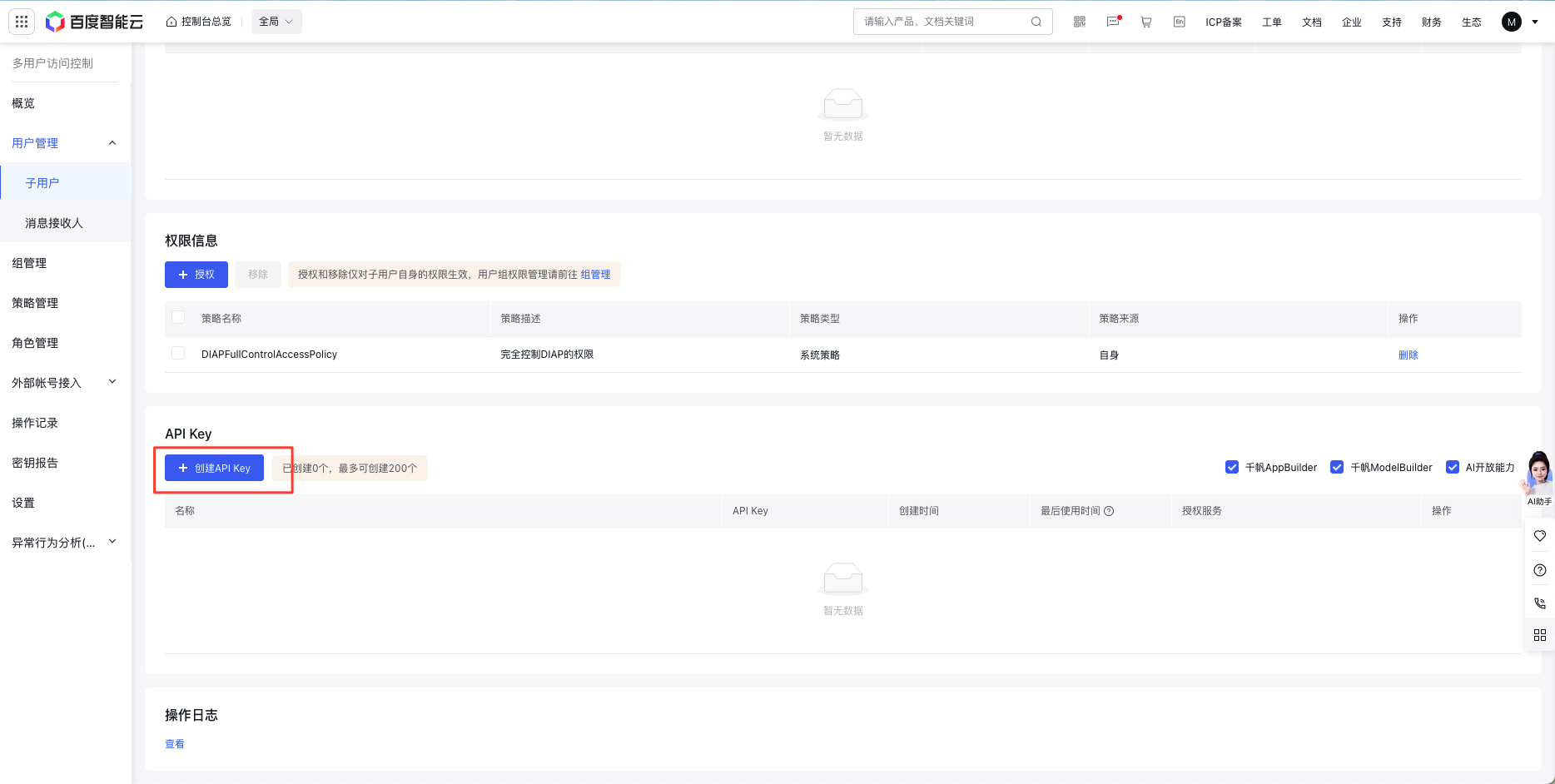
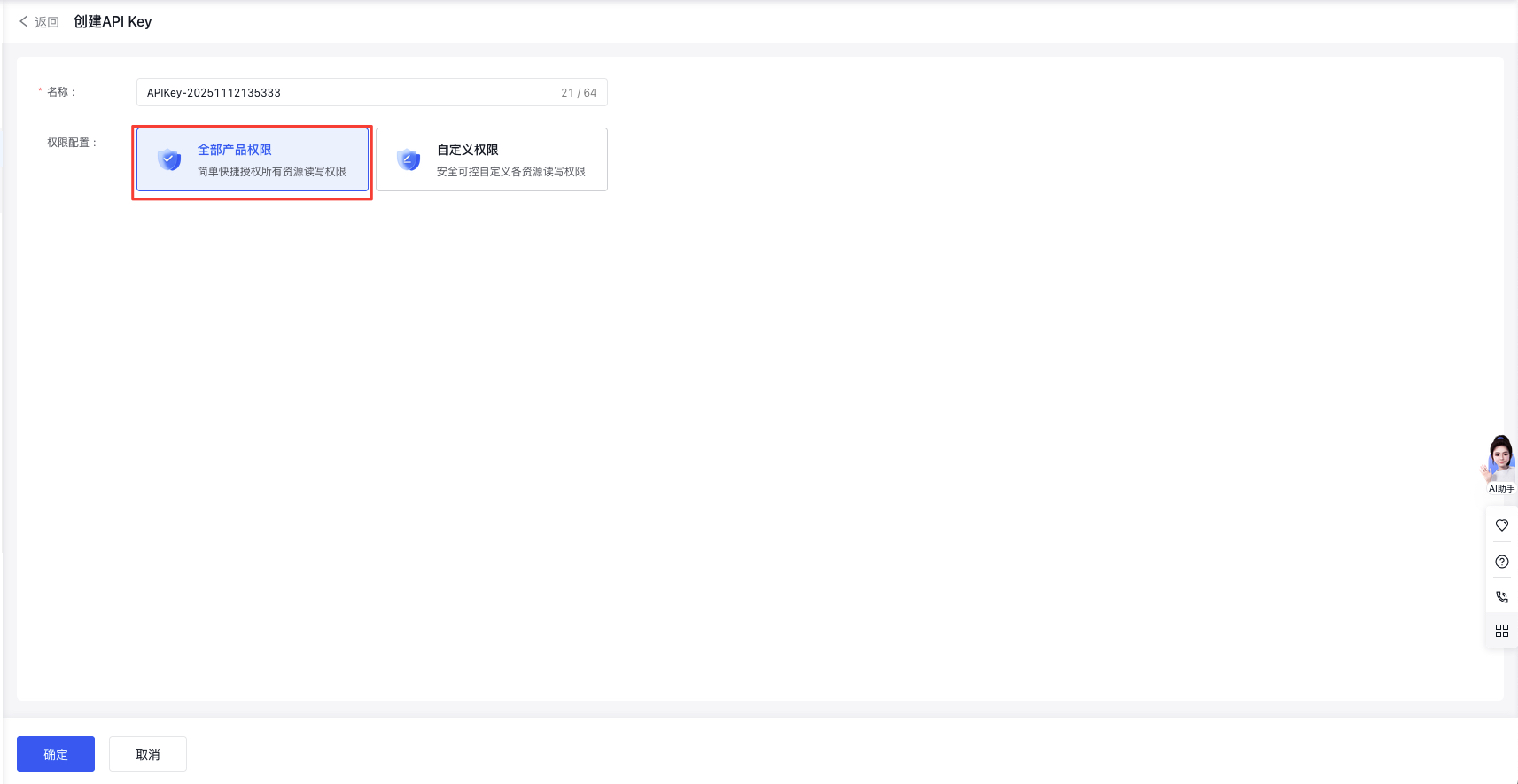
详细步骤:
- 登录百度智能云控制台
- 进入「安全认证-API Key」页面
- 点击「创建API Key」,选择"全部产品权限"
- 复制生成的API Key(格式:
bce-v3/xxxxx)
Q6: 如何让多模态大模型输出目标的检测框?
A: 在多模态技能创建时,输出参数新增需要输出检测框的目标名称,类型选择为「Array<Target>」。当模型判断图片中存在目标对象时,即返回对应目标的坐标值。
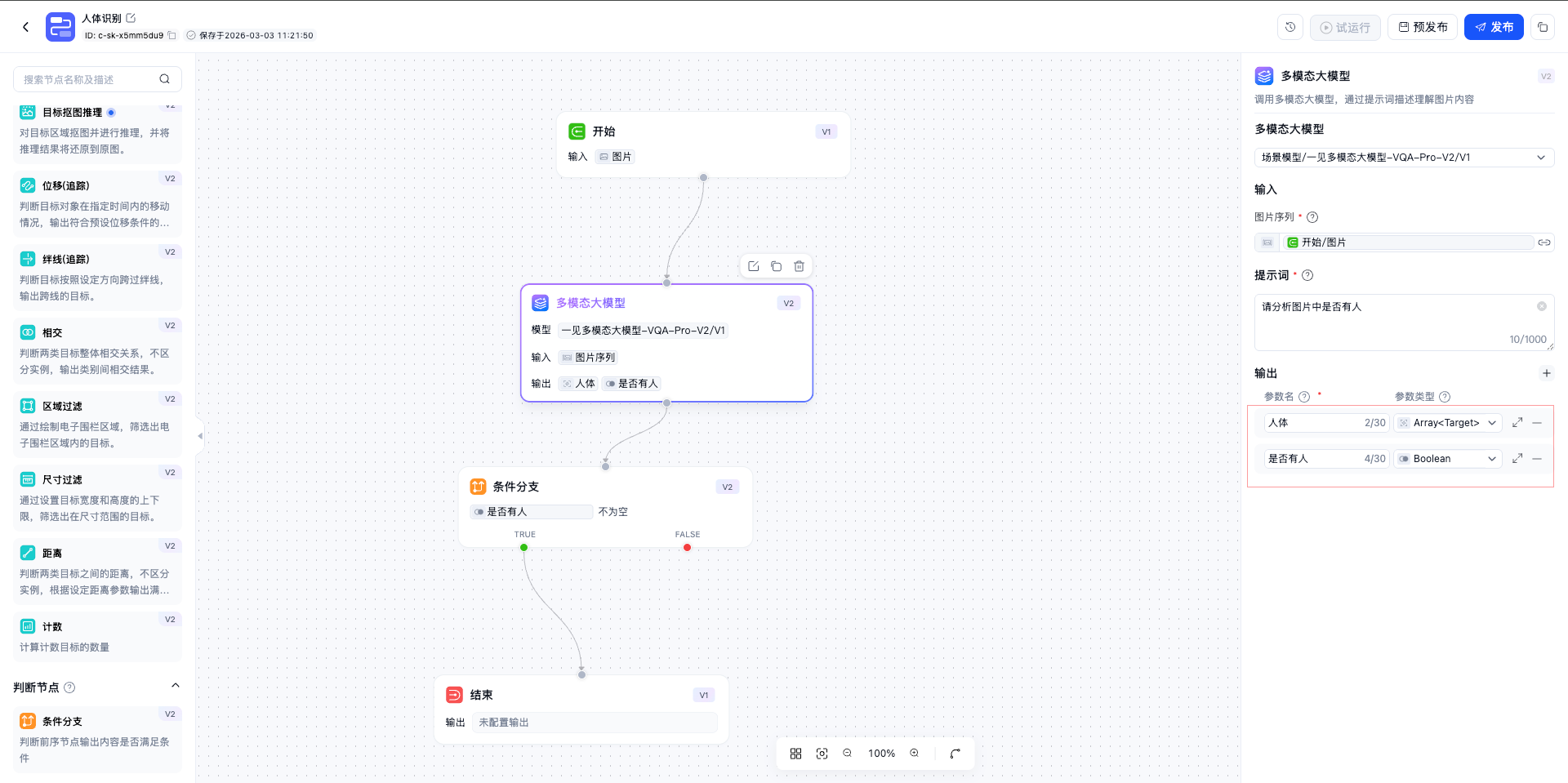
注意: 「Array<Target>」类型的输出不支持被后续节点引用。
示例输出:
1{
2    "success": true,
3    "result": {
4        "outputs": [
5            {
6                "name": "message",
7                "displayName": "输出信息",
8                "type": "TemplateString",
9                "schema": null,
10                "defaultValue": "",
11                "value": "",
12                "valueType": "TemplateString",
13                "description": "",
14                "optional": true,
15                "readonly": false,
16                "constraint": null,
17                "visuals": ""
18            },
19            {
20                "name": "是否有人",
21                "displayName": "是否有人",
22                "type": "Boolean",
23                "schema": null,
24                "defaultValue": "false",
25                "value": "true",
26                "valueType": "Boolean",
27                "description": "",
28                "optional": true,
29                "readonly": false,
30                "constraint": null,
31                "visuals": ""
32            },
33            {
34                "name": "人体",
35                "displayName": "人体",
36                "type": "Array<Target>",
37                "schema": null,
38                "defaultValue": "",
39                "value": "[{\"predictions\": [{\"bbox\": [[0.312, 0.623, 0.745, 0.976]]}]}]",
40                "valueType": "Array<Target>",
41                "description": "",
42                "optional": true,
43                "readonly": false,
44                "constraint": null,
45                "visuals": ""
46            }
47        ]
48    }
49}
B: 在多模态技能创建时,输出参数新增需要输出检测框的目标名称,类型选择为「Array<Detection>」。当模型判断图片中存在目标对象时,即返回对应目标的坐标值。
注意: 「Array<Detection>」类型的输出支持被后续节点引用。
示例输出:
1{
2  "success": true,
3  "result": {
4    "outputs": [
5      {
6        "name": "message",
7        "displayName": "输出信息",
8        "type": "TemplateString",
9        "schema": null,
10        "defaultValue": "",
11        "value": "",
12        "valueType": "TemplateString",
13        "description": "",
14        "optional": true,
15        "readonly": false,
16        "constraint": null,
17        "visuals": ""
18      },
19      {
20        "name": "object1",
21        "displayName": "object1",
22        "type": "Array<Detection>",
23        "schema": null,
24        "defaultValue": "",
25        "value": "[{\"image_id\": null, \"source_id\": null, \"image_url\": null, \"description\": null, \"answers\": null, \"image_base64\": null, \"topk\": null, \"predictions\": [{\"bbox\": [697.728, 194.672, 405.744, 479.274], \"bbox_id\": 0, \"quadrangle\": null, \"key_points\": null, \"confidence\": 0.95, \"segmentation\": null, \"polygon\": null, \"area\": null, \"ocr\": null, \"features\": null, \"track_id\": null, \"categories\": [{\"id\": \"person\", \"class_id\": null, \"name\": \"人\", \"confidence\": 0.95, \"super_category\": null, \"all_probs\": null}], \"roi_ids\": [], \"parent_id\": null, \"children_ids\": [], \"answer\": \"穿着白色上衣和黑色裤子,低头看手机\"}], \"roi_ids\": [], \"answer\": null}]",
26        "valueType": "Array<Detection>",
27        "description": "",
28        "optional": true,
29        "readonly": false,
30        "constraint": null,
31        "visuals": ""
32      }
33    ]
34  }
35}

