

MCP Server接入指南
更新时间:2026-10-12
1. 概述
本平台支持通过 MCP (Model Context Protocol) 标准接入智能体,当前兼容四种核心类型:Prompt、Tool、Resource 和 ResourceTemplate。
2. 接入配置
支持单个或多个 MCP Server 同时接入同一 Agent 实例。配置采取实例级(Instance Level)管理,在创建智能体实例时进行指定。 也支持在控制台通过 MCP 模块关联。
配置参数表
| 字段 | 类型 | 描述 | 示例值 |
|---|---|---|---|
[].name |
String | 服务唯一标识名称 | baidu-weather |
[].endpoint |
String | MCP Server 服务地址 | https://qianfan.baidubce.com/... |
[].protocol |
String | 协议类型(支持 HttpStreamable, SSE) |
HttpStreamable |
[].headers |
Map | HTTP 请求头 | {"Authorization":"Bearer xxxxx"} |
[].response_filter |
Map | JSON 响应字段过滤映射 | 详见后续章节 |
提示:推荐优先使用 HttpStreamable 协议。MCP Server 若要完整支持 Agent 的各项功能,服务端须实现以下核心接口(参考 MCP 官方架构文档):
基础接口
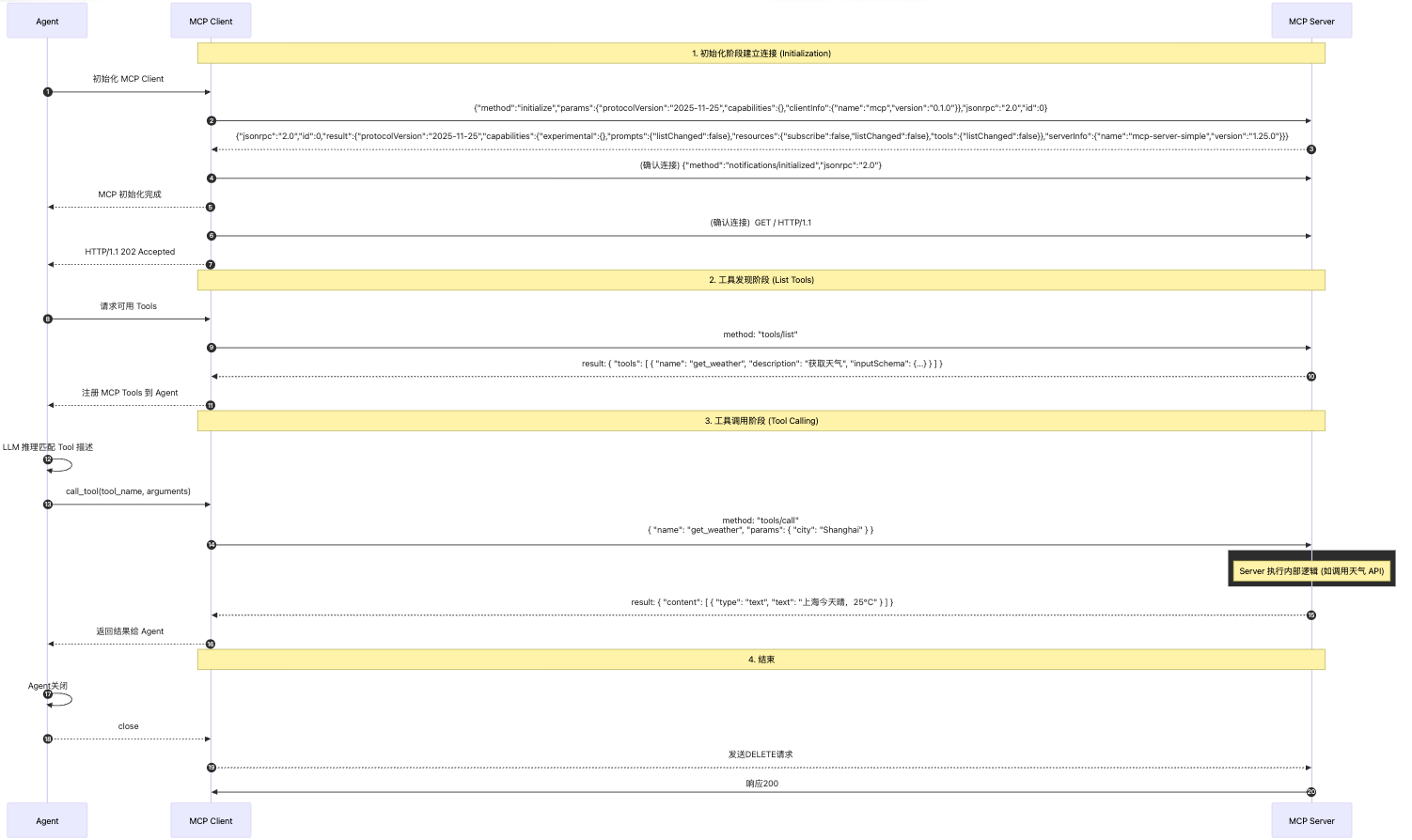
initialize: 完成握手与能力协商。tools/list/tools/call: 实现工具的发现与执行。 Prompt 与 Resource 扩展接口 若需使用 Prompt 或 Resource 功能,还必须实现以下接口:prompts/list: 返回可用的 Prompt 模板列表。prompts/get: 根据名称获取具体的 Prompt 内容(支持{Q}占位符)。resources/list: 返回该 Server 提供的所有 Resource 资源列表。resources/read: 读取指定 Resource 的内容(用于上下文加载)。- `resources/templates/list`: 处理资源模板的动态解析。
3. 功能特性与约束
3.1 核心机制
- 工具总结:MCP Tool 的调用结果将由大模型总结后反馈给用户;若配置了场景人设(Persona),则总结将遵循该人设风格。
- Resource 限制:MCP Resource 与 ResourceTemplate 仅在启用场景人设时生效,且不支持参数补全,需通过
__MCP_META__进行显式定义。 - Prompt 处理:当用户 Query 命中 MCP Prompt 描述时,Prompt 内容将直接作为模型输入,不经过人设润色。建议 Server 自行拼接 Query 或在 Prompt 中预留
{Q}占位符。
3.2 性能与安全限制
为保障 Agent 响应质量,请遵守以下限制:
- 超时控制:
tools/list需在 3s 内响应,tools/call需在 10s 内响应。 - 内容截断:单次工具调用结果上限为 2000 字符,超出部分将截断并交由模型总结。
- TTS 兼容性:输出内容需为
text类型,建议单次返回控制在 500 字以内,以优化播报体验。 示例:
JSON
1{
2  "content": [{ "type": "text", "text": "这是给模型总结播报的内容" }]
3}
3.3 工具更新机制
系统暂不支持自动更新,若工具定义发生变更,需通过以下方式手动触发刷新:
- 服务端触发:发送指令
[E]:[CMD]:[MCP_TOOLS_CHANGED]。 - SDK 触发:通过客户端 SDK 发送事件消息
[E]:[CMD]:[MCP_TOOLS_CHANGED]。
4. 高级功能配置
4.1 ResponseFilter (响应过滤)
当返回结构化 JSON 数据时,可通过配置过滤关键字段,提升模型总结的准确性。
配置示例:
JSON
1"response_filter": {
2    "weather_tool": ["data.temperature", "data.condition"],
3    "location_tool": ["city", "address", "coordinates.lat"]
4}- 注意:字段路径区分大小写;支持数组遍历(使用
[]。
4.2 MCP_META 参数映射
通过在 Description 中嵌入 __MCP_META__,可将系统变量映射至 MCP 工具参数:
JSON
1__MCP_META__: {"params":{"user_id": "sys_user_id", "query": "query"}, "triggers": ["打开空调"]}变量映射说明
params: 定义映射规则,Key 为 MCP Server 定义的工具参数名,Value 为来源变量。triggers: 触发词列表。 用户提问中命中任一触发词时,系统就会直接匹配并调用该 MCP 工具。-
系统变量 (以
sys_开头):这些变量由平台侧自动注入,具备唯一性和全局性,直接从系统运行时获取。sys_user_id: 当前登录用户的唯一标识。sys_device_id: 当前交互设备的唯一标识。
-
内置查询变量:
query: 映射用户的原始提问内容,用于工具处理。
-
自定义变量:
- 若需传递非系统变量,可通过指令
[SET]:[VARIABLES]: {"key":"value"}在交互过程中手动设置。
- 若需传递非系统变量,可通过指令
5. 开发最佳实践
- 命名规范:建议采用动宾结构,如
open_airconditioner。 - 描述词优化:描述需清晰简洁。可在描述最后一行添加
call_examples: 指令1, 指令2,以提升工具命中率。 - 参数枚举:尽可能使用枚举值限制参数范围,减少模型幻觉。
代码示例 (基于 FastMCP)
Python
1from mcp.server.fastmcp import FastMCP
2
3mcp = FastMCP(name="iot-mcp-server-demo", host='0.0.0.0', port=8988)
4
5@mcp.tool(title="打开空调")
6async def open_airconditioner(device_id: str) -> str:
7    """
8    打开空调
9    Args:
10	    device_id: 设备ID
11    __MCP_META__: {"params":{"device_id": "sys_device_id"},"triggers": ["打开空调"]}
12    call_examples: 打开空调
13    """
14    return "空调已打开"
15
16if __name__ == "__main__":
17    mcp.run(transport='streamable-http')
MCP 交互时序
6. 控制台配置
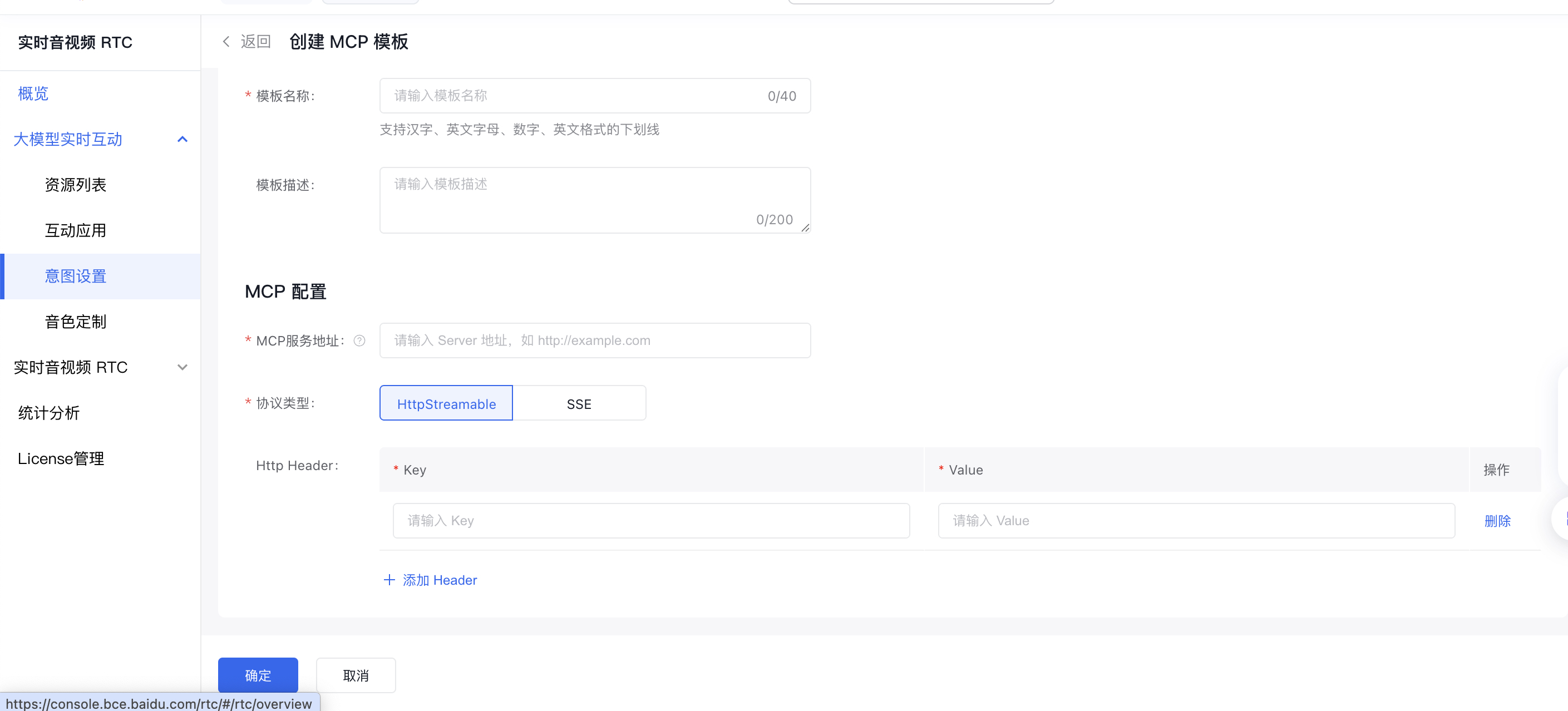
- 第一步:创建MCP模版,「意图设置」-「MCP」-创建MCP模版,配置MCP
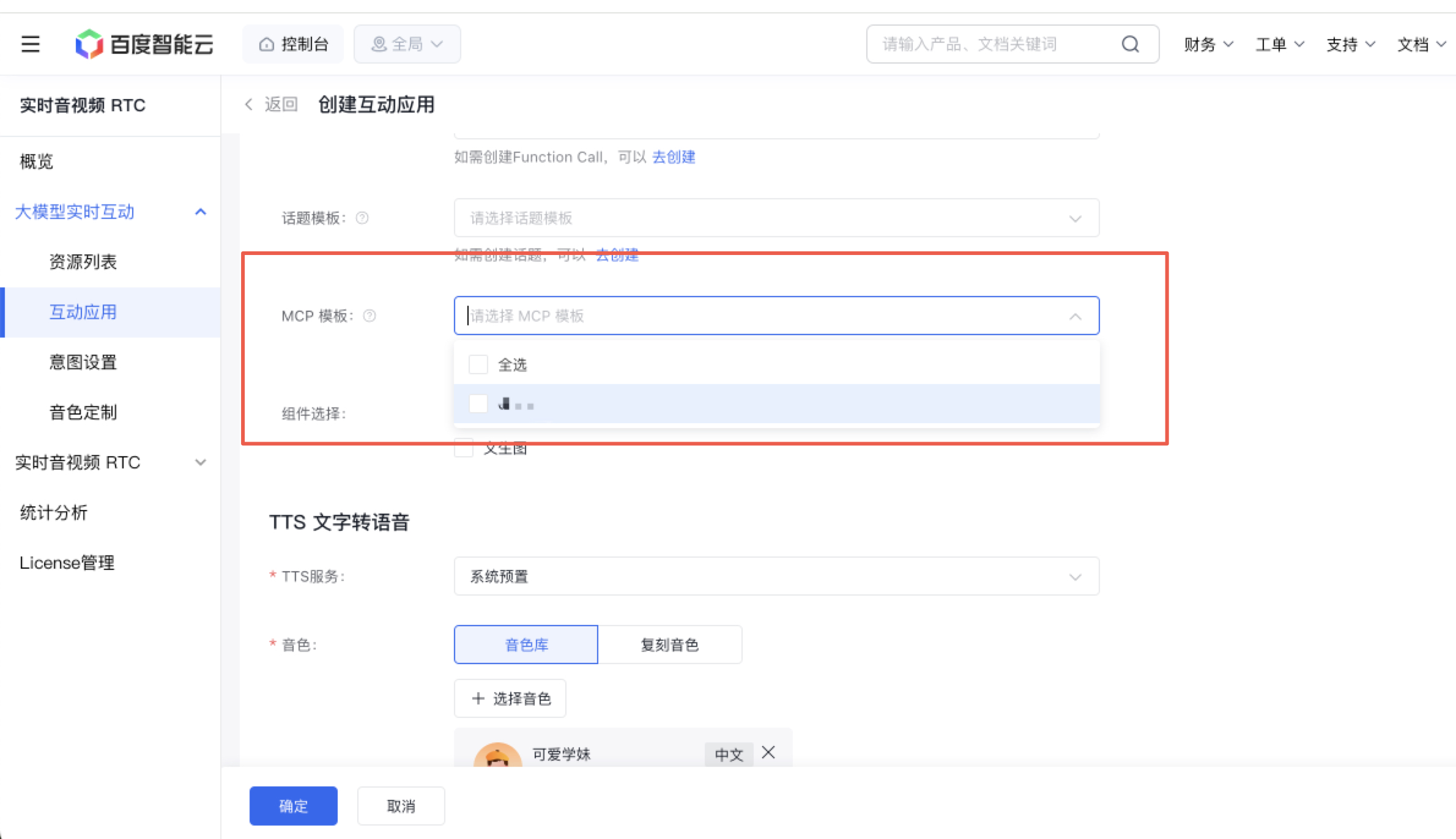
- 第二步:将创建好的MCP模版绑定至互动应用上

评价此篇文章